
If your company continues to treat training as a schedule of courses, you’re probably measuring the effort, not the learning. The point isn’t how many hours you provide, but whether the team actually applies new skills in their day-to-day work.
The issue ofthe learning environment has become urgent even outside of school. In Italy, only 13% of schools incorporate artificial intelligence into their curricula, while 38% of parents support its use to personalize learning, according to the latest statistics on education in Italy. This gap between what people expect and what the systems are able to offer also accurately describes many small and medium-sized enterprises (SMEs): the need for upskilling is growing faster than the ability to develop effective training programs.
In a company, a learning environment is not just an LMS platform, a one-time course, or a video library. It’s an ecosystem designed to help people learn better, faster, and more consistently. If you design it well, you’ll improve onboarding, accelerate data adoption, make it easier to update skills, and build a culture of learning on the job.
Many companies still follow a simple model: they identify a need, purchase a course, bring the team together, and hope that something will change. This approach can work for transferring information. It’s much less effective when you need to change behaviors, processes, or decision-making skills.
The problem is that work is constantly changing. Tools change, workflows change, and even the minimum skill requirements for non-technical roles change. If training remains disconnected from the real-world context, the team learns in the abstract and then goes back to working the same way as before.
A course teaches content. A learning environment changes the way people learn every day.
In a business context, this shift in approach is crucial. An effective learning environment makes learning accessible when it’s needed, connects it to the real challenges of the role, and integrates it into work processes. It doesn’t force people to “step away from work to learn.” It helps them learn while they work.
Three signs indicate that the traditional model is no longer sufficient:
For an SME, this isn’t just a theoretical issue. If you want to promote data literacy, improve the use of dashboards, streamline AI adoption, or speed up onboarding, you need a more mature system—not a collection of isolated courses, but an organized, measurable environment designed around your business objectives.
A learning environment is not a classroom. Nor is it a platform. It’s more useful to think of it as an ecosystem: if an important part is missing, everything else loses its effectiveness.
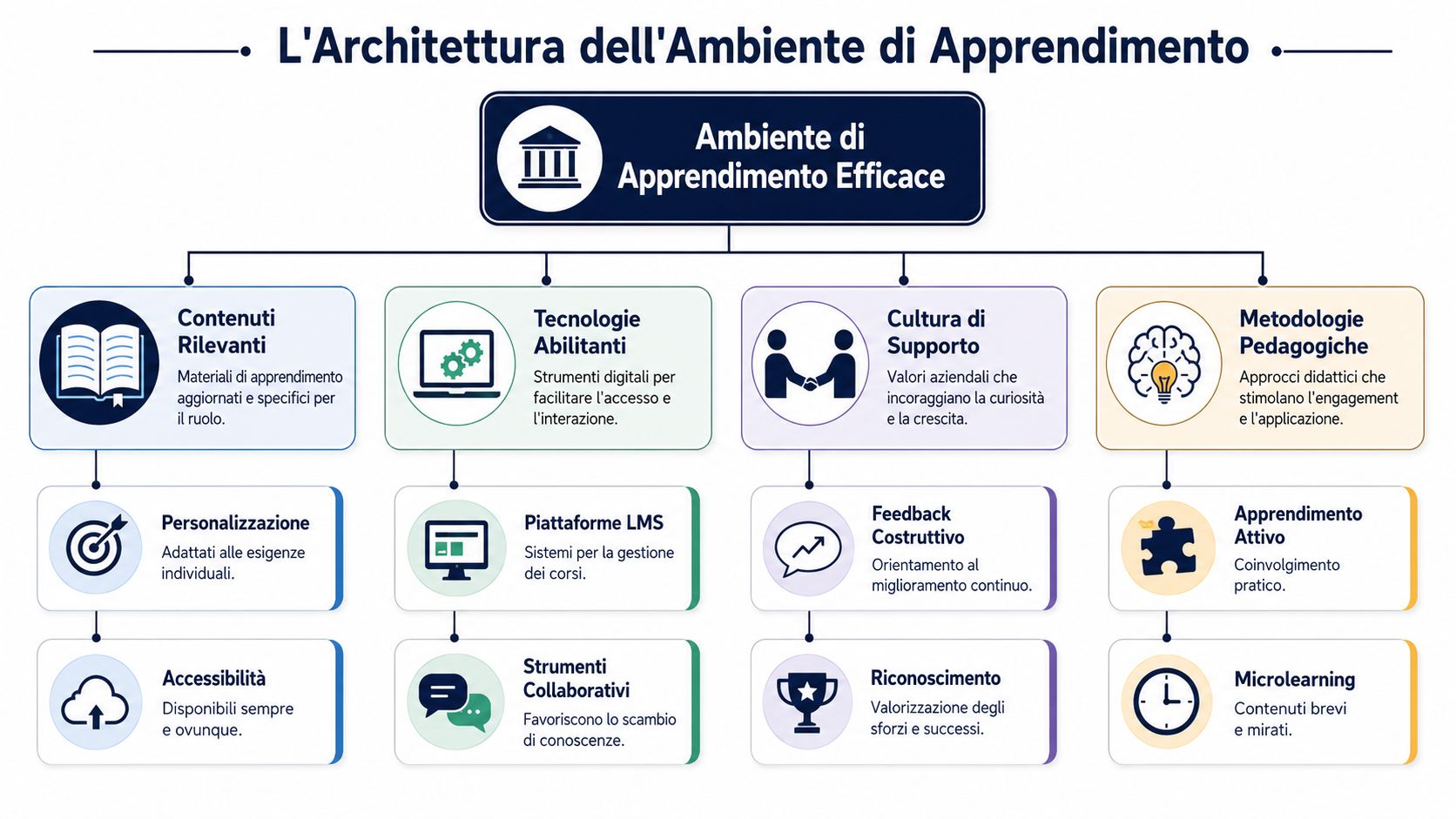
The first pillar is space. In a company, this can be physical, digital, or a combination of both. A well-designed space helps people focus, collaborate, and experiment. In practice, this means reconfigurable meeting rooms, workshop areas, organized repositories, topic-based Slack channels, and documentation that’s easy to find.
The second pillar is technology. This is where many people get their priorities wrong. Technology isn’t meant to impress; it’s meant to empower. An LMS, a knowledge base, Microsoft Teams, Notion, ticketing tools, or operational dashboards are only valuable if they reduce friction and make learning more user-friendly.
The third pillar is pedagogy. Simply put, it’s the way you help people learn. Lecture-style teaching still has a role to play, but it’s not enough on its own. Hands-on activities, microlearning, simulations, peer learning, rapid feedback, and assignments based on real-world problems work best.
The fourth pillar is culture. If the team fears making mistakes, avoids asking questions, or views training as a form of scrutiny, the environment grinds to a halt. If, on the other hand, managers value experimentation, discussion, and continuous improvement, learning becomes an integral part of the work.
Rule of thumb: If one of the four pillars is weak, the learning environment loses its coherence. A good platform in a closed culture is not enough.
To a non-technical manager, this definition may still seem abstract. It is therefore helpful to break it down into observable indicators.
In practice, a well-designed learning environment looks something like this:
If you want to learn more about a highly effective approach for teams that learn by doing, I recommend this Guide to Discovery Learning. It’s especially useful when you want to shift the focus from imparting knowledge to problem-solving.
Here is a good summary: the learning environment is not merely the setting for training. It is the framework that makes it possible to learn in a continuous, autonomous, and practically relevant way.
There is no one-size-fits-all model. In SMEs, the choice usually comes down to three formats: physical, digital, and hybrid. Understanding the differences helps avoid misguided investments and unrealistic expectations.
| Model | Where it works best | Main Advantage | Main limitation |
|---|---|---|---|
| Physicist | Workshops, onboarding, training sessions, cultural alignment | Immediate interaction and direct comparison | Less flexibility |
| Digital | Continuing education, on-demand content, distributed teams | Fast Access and Scalability | Risk of dispersion |
| Hybrid | Almost all modern SMEs | Balance Between Relationships and Flexibility | It requires more planning |
The physical environment remains very useful when you want to build trust, bring doubts to light, develop interpersonal skills, or work on complex cases as a group. A room with movable tables, a whiteboard, a shared screen, and supporting materials is often more valuable than a presentation full of slides.
The digital environment is the natural solution when work is distributed or time is limited. Here, however, simply “uploading content” isn’t enough. You need a well-organized ecosystem: an LMS for learning paths, Slack or Teams for collaboration, project tools for implementation, and dashboards to track usage and progress.
For most SMEs, the most effective model is the hybrid one. Not because it’s trendy, but because it combines the best of both worlds. Use in-person sessions to engage, clarify, and have the team practice. Use digital tools to reinforce, document, and make learning accessible over time.
A simple example:
For those working on skills that require progressive practice, it is also helpful to understand the difference between shared work time and individual work time. In this regard, the article on synchronous and asynchronous process optimization provides a good foundation for better organizing learning and operations.
An interesting parallel can be drawn from contexts where people learn by making decisions without immediate risks. In the financial world, for example, a comprehensive guide to demo trading clearly illustrates the value of a controlled practice environment: first you experiment, then you analyze, then you improve. The same principle applies in a business setting when you have your team practice using dashboards, reports, or workflows before integrating them into critical processes.
The hybrid approach works when you clearly distinguish between what should be experienced together and what can be learned independently.
Many companies build their training programs starting with the tools. That’s the wrong approach. First, you need to figure out what behaviors you want to develop, what problems you want to solve, and what metrics you’ll use to gauge whether you’re making progress.
The most useful reference here is a very clear principle of the Italian education system. The “Piano Scuola 4.0” and the “Next Generation Class” initiative explicitly link the creation of new, flexible learning spaces to the development of active, hands-on teaching methods. This point is also crucial in the workplace: space is not neutral; it must support specific objectives.
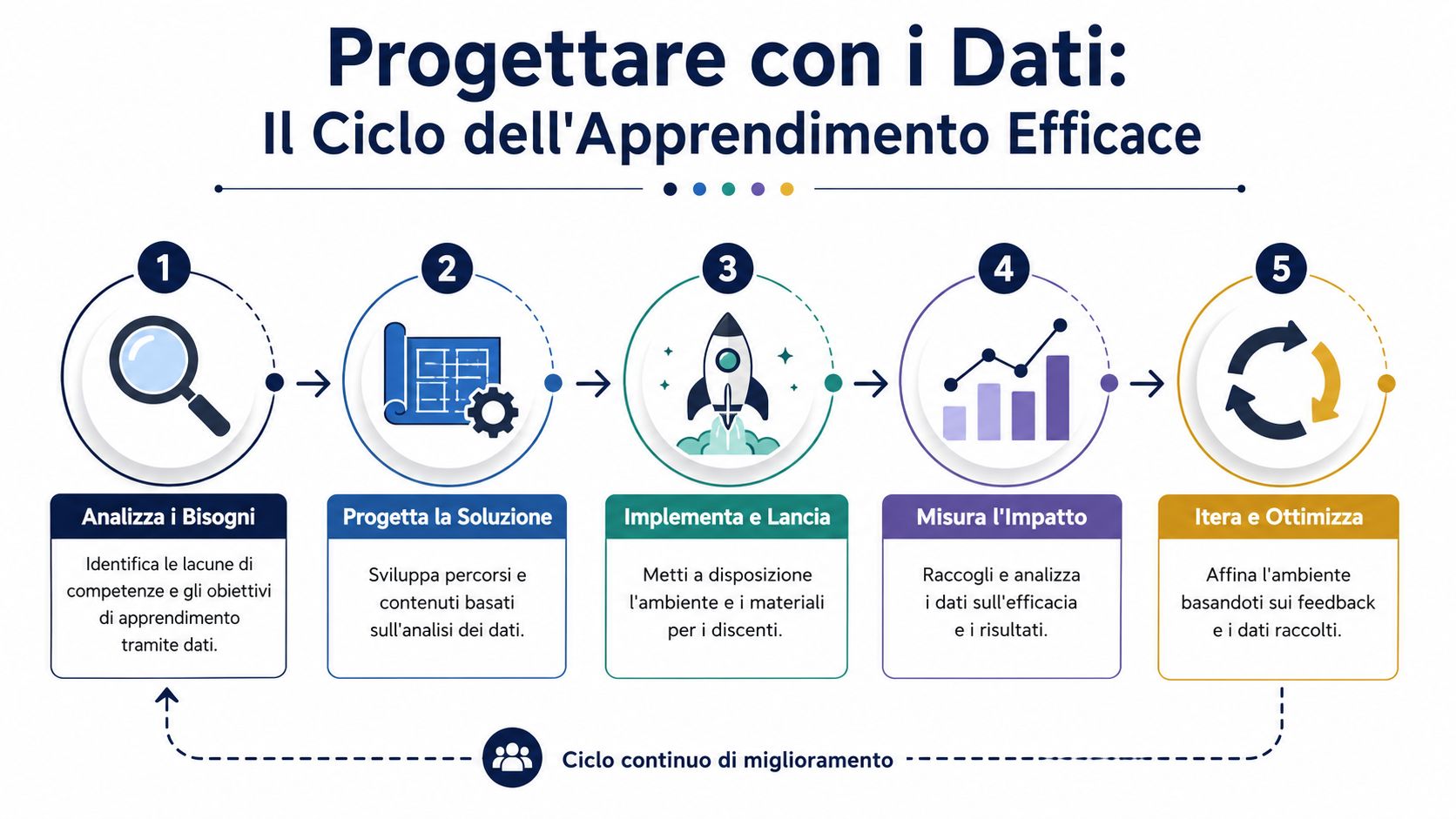
A data-driven approach tothe learning environment can follow five steps.
Analyze the needs
Identify where the team is slowing down, which errors are recurring, where processes require too much support, and which skills are lacking. Data can come from operational performance metrics, internal surveys, support tickets, process audits, or feedback from managers.
Design the solution
Define the format, tools, pace, and content. Don’t start with “let’s create an Excel course” or “we need more videos.” Start with objectives such as “the sales department needs to be able to read a report without assistance” or “the operations team needs to use insights to set priorities.”
Implement and launch
. Clearly introduce the new environment. Explain who it’s for, when to use it, what to expect, and how it relates to real-world work. Providing clarity from the start reduces resistance and confusion.
The cycle doesn't end with the launch. The last two phases make all the difference.
If your team doesn't start using the platform on its own after launch, the problem is rarely a lack of motivation. More often than not, it's the design.
For an SME, this approach offers a tangible benefit. It helps avoid projects that are too broad and underutilized. Instead of overhauling the entire corporate training program, you can start with a specific use case—such as sales onboarding, interpreting KPIs, or using a new dashboard—and make improvements in short cycles.
When designing with data, stop asking yourself, “Which platform should I buy?” and start asking, “What behavior do I want to make easier, more frequent, and more measurable?” That’s a much more useful question.
Theory becomes convincing only when it is applied to real-world processes. In small and medium-sized enterprises (SMEs), a well-designed learning environment is particularly useful when the team needs to learn quickly without interrupting their work.
One statistic makes this scenario very real: among Italian SMEs, 29.7% of companies are already adopting artificial intelligence for data analysis, and an additional 38% are interested in doing so, as reported in the analysis of artificial intelligence strategies for SMEs. This means that the technological foundation for data-driven learning environments is no longer limited to large organizations.
An SME hires new salespeople every few months. The challenge isn't just about communicating procedures, but about getting people to use tools, language, and priorities consistently. An effective environment can combine:
The advantage here is simple: the new hire doesn't receive everything at once, but has access to what they need when they need it.
This is the most recent example. A marketing, operations, or administration team needs to start analyzing data more effectively, interpreting trends, using automated reports, and asking analysts more specific questions.
A well-designed learning environment avoids two common mistakes. The first is presenting content that is too technical. The second is presenting dashboards without context. The best approach generally combines practical examples, simplified terminology, short coaching sessions, and activities related to real-world decisions, such as business priorities, inventory, or ticket trends.
When you teach data literacy to a non-technical team, you don't have to turn everyone into analysts. You need to make analysis more accessible in day-to-day decision-making.
Another common scenario involves people who are very skilled at the operational level but need to develop as coordinators. In this case, the learning environment cannot be limited to theoretical content on leadership.
A system works best when it has:
In all these scenarios, the real goal isn’t simply “to provide training.” It’s to make work clearer, skills more transferable, and decisions more sound.
If you only measure how many people participated or how many modules they completed, you’re just scratching the surface. An effective learning environment must be evaluated on multiple levels, because the goal isn’t content consumption, but a change in behavior and outcomes.
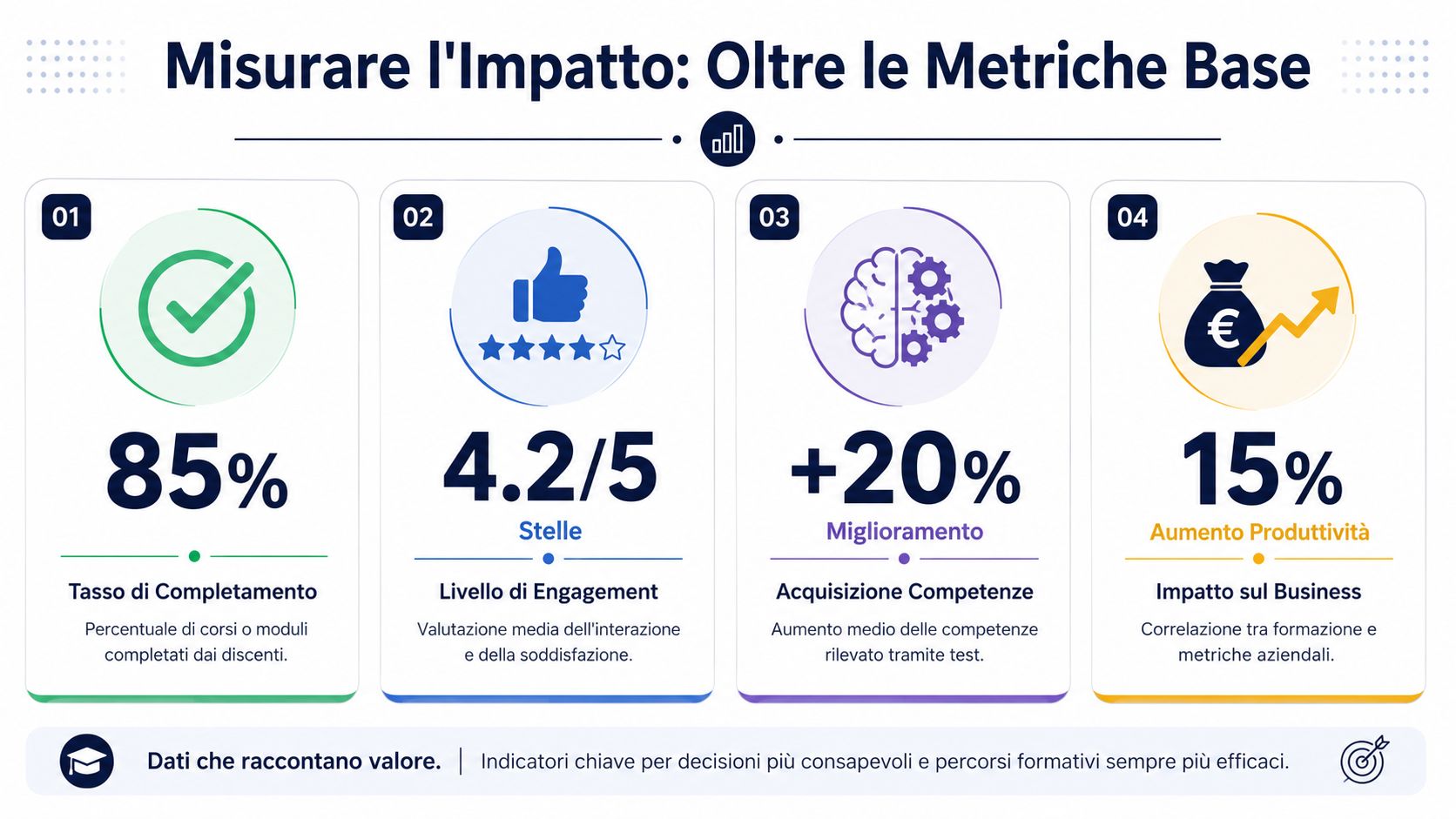
The first level is engagement. Here, you observe whether the team is truly engaging with the environment and using it. You can look at logins, frequency of use, time spent, spontaneous return to materials, participation in discussions, or requests for additional content.
The second level islearning. The question becomes more interesting: Are people acquiring new skills? You can assess this through practical exercises, simulations, peer reviews, short application tests, and direct observation on the job.
The third level isthe impact on the business. This is the level that matters most to business leaders. Are the new skills improving the process? Are people making decisions more quickly? Are reports being read more effectively? Are recurring errors, unnecessary escalations, or operational bottlenecks decreasing?
The connection to the business shouldn't be improvised. It needs to be planned in advance. If you're training the sales team to interpret data, you need to already know which metrics to look for. If you're working with operations, you need to define in advance where the improvement should be seen.
To keep this work organized, it’s best to use a few clear, agreed-upon metrics. These practical examples of KPIs can serve as a good starting point; you can then adapt them to the educational context.
Here's a helpful tip:
You don't need a complex dashboard to get started. What you need is a credible connection between what you teach and what the company wants to improve.
This approach also helps in conversations with management. Instead of saying, “We provided training,” you can say, “We’ve created a learning environment that supports a critical process, and we can demonstrate its effects.” It’s an important shift in language. And it often changes the level of attention the project receives as well.
A modern learning environment is not just a fancier training package. It is an organizational infrastructure that makes upskilling continuous, context-driven, and measurable. For an SME, this approach is particularly useful because it allows the company to focus on strategic skills without creating programs that are cumbersome and difficult to maintain.
An interesting practical example comes from AI adoption initiatives in SMEs. In a realistic roadmap, a pilot project can take 3 to 6 weeks. By applying a similar approach to building a learning environment, you can achieve observable results within a quarter, starting with a very specific use case.
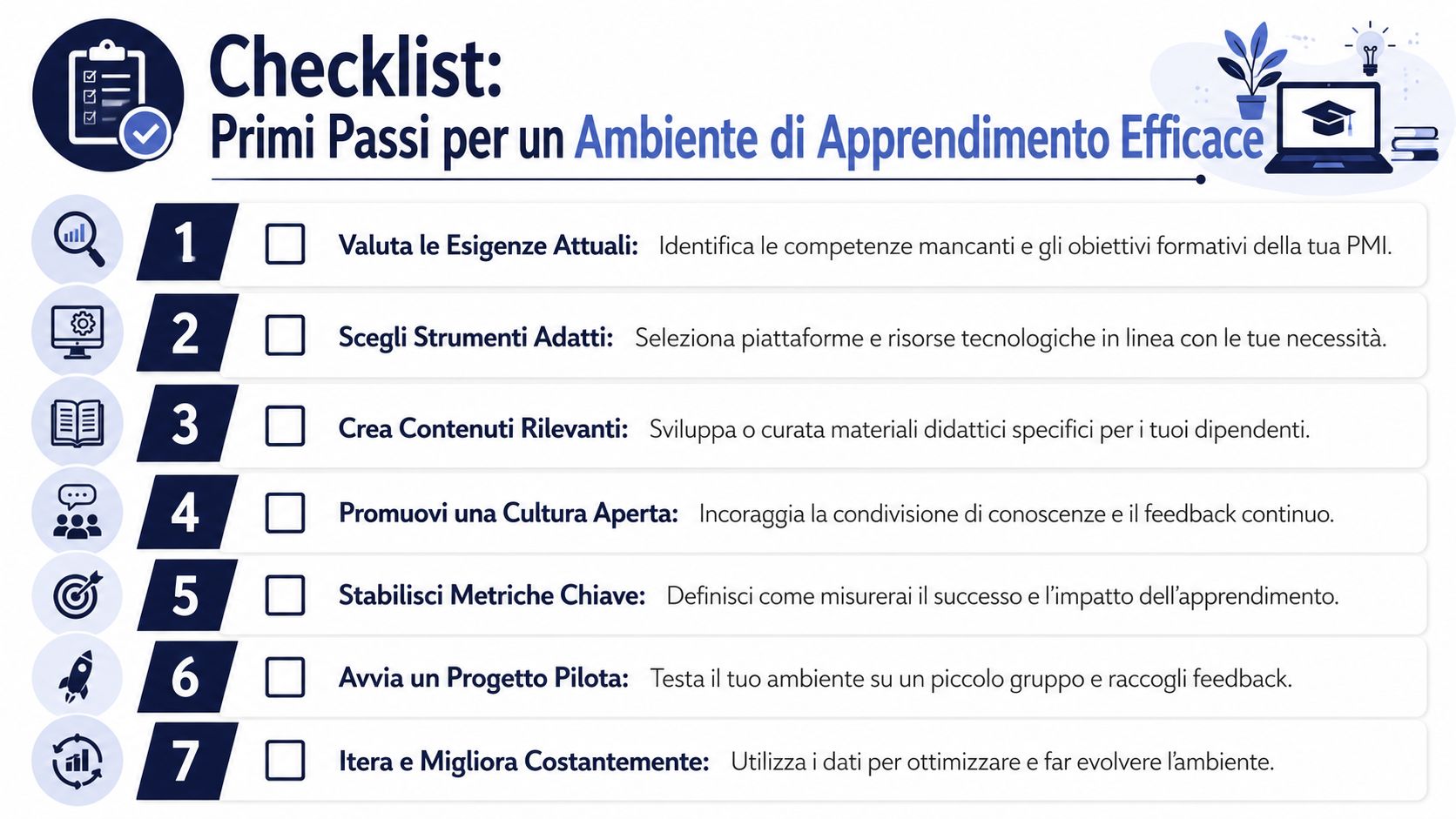
Here's the most useful summary to keep in mind:
If you're a non-technical leader, this sequence is often the easiest to manage.
Choose a single use case
Don't start with the entire company. Start with onboarding, a team's data literacy, the use of KPIs, or the adoption of a new process.
Map out what you already h
Many small and medium-sized businesses already have useful materials scattered across drives, slides, chats, and procedures. Organizing them is often the most effective first step.
Talk to the team at
. Ask them where they get stuck, what they don't understand, what information they look for most often, and which tools they find complicated.
Design a streamlined learning path
Combine a few well-crafted elements: an introductory session, short learning materials, hands-on exercises, feedback, and a final review.
Define two or three success metrics
You need to be able to tell at a glance whether the driver is working effectively. It’s better to have a few clear indicators than a vague measurement.
Collect qualitative feedback
In addition to the numbers, pay attention to language, independence, the quality of the questions, and confidence in using the tools.
Iterate without waiting for perfection
An effective learning environment isn't perfect from the start. It improves as you use it, observe it, and adapt it.
The ultimate goal is clear: to build an organization that learns faster than processes, markets, and tools change. This is where training, data, and culture truly begin to work together.
If you want to turn business data into clear insights and use analytics to support upskilling, decision-making, and a data-driven culture, check out ELECTE, an AI-powered data analytics platform for SMEs. You can see how it works, explore automated reports, and learn how to make analytics accessible even to non-technical teams.

.svg)


.svg)
.svg)