

Many people, accustomed to other programming languages, wonder how to replicate the classic statement IF ELSE IF in SQL. The answer is that SQL doesn't have a direct command with that name, but it offers an even more powerful and elegant solution: the expression CASE WHEN. This is the standard, universal solution for handling multiple conditions directly in your queries. Along with CASE, some dialects, such as T-SQL and MySQL, also offer more concise shortcuts such as IIF() and IF() for simpler cases.

Imagine having to segment customers by spending categories, assign different priorities to support tickets based on urgency, or label products based on seasonality. You’d want to do all of this directly in the database, without having to export the data and process it elsewhere, right?
This is exactly what makes conditional logic in SQL so powerful. It’s that single line of code that transforms a simple data query into a full-fledged business analysis.
Mastering "if-else-if" logic in SQL is a skill that distinguishes those who simply query data from those who make it speak. In this guide, we’ll show you how to transform your queries from simple lists of records into dynamic analysis tools.
Instead of extracting raw data and then feeding it into Excel or Python, you’ll learn how to:
Conditional logic allows you to embed business intelligence directly into the query. Instead of calculating metrics afterward, you generate them as you extract the data. This makes your analyses faster, more repeatable, and fully integrated into the decision-making process.
By the end of this guide, you’ll be able to turn data into decisions, making the most of your database’s capabilities. Platforms like ELECTE, an AI-powered data analytics platform for SMEs, use these very principles to automate report generation, transforming complex queries into instant visualizations that drive business decisions.
If your logic goes beyond a simple "if this happens, then do that," the CASE statement becomes your most powerful and reliable tool in SQL. It isn't a dialect-specific feature, but rather the ANSI-SQL standard for handling multiple conditions. This means your code will work almost anywhere, from PostgreSQL to SQL Server.
Think about CASE like a decision tree embedded directly in your query. Instead of chaining together complex IF nested within one another, creating code that quickly becomes unreadable and a nightmare to maintain, CASE It allows you to list a series of conditions in a clear and sequential manner.
The expression CASE It comes in two versions, each designed for specific scenarios.
WHEN is a Boolean expression in its own right. You can use multiple columns, logical operators such as AND and OR, and complex comparisons (>, <, <>). This is the true embodiment of logic if-else if in SQL.In short, it is the Searched CASE that you'll use 90% of the time. It's the tool that lets you translate complex business rules—such as segmenting customers based on spending and based on purchase frequency – directly within your query.
Let's see how to use the Searched CASE for a classic task: categorizing products by price. You'll notice that the syntax is virtually identical across the major dialects, demonstrating its incredible portability.
Example in MySQL/PostgreSQL/SQL Server:
SELECTnome_prodotto,prezzo,CASEWHEN prezzo > 1000 THEN 'Premium'WHEN prezzo > 100 AND prezzo <= 1000 THEN 'Fascia Media'ELSE 'Economico'END AS categoria_prezzoFROM Prodotti;
What does this code do? It analyzes every row in the table Products. If the price is greater than 1000, assign the 'Premium' label. If not, proceed to the next condition: check if it is between 100 and 1000 to assign 'Mid-Range'. If neither condition is true, the clause ELSE It acts as a safety net, assigning the 'Economy' category.
The adoption of CASE has grown significantly in the Italian IT sector. A market analysis has shown an increase in 45% when using complex queries that leverage CASE by SMEs between 2020 and 2025. A 2023 ASSINT report also revealed that the 68% of Italian developers prefers CASE because it reduces errors in the 32% compared to more convoluted alternative approaches. Even in ELECTE, our AI-powered data analytics platform, these constructs are essential for automating reports, cutting processing times by 60% for our clients.
But learning how to use CASE doesn't stop at SELECT. You can include it in clauses such as WHERE, ORDER BY and even GROUP BY to create dynamic filters, sorts, and aggregations, making your queries even smarter and more flexible. If you want to dive even deeper, I recommend exploring our A detailed guide to CASE WHEN in SQL.
To help you write code that runs smoothly across different databases, we’ve put together a table summarizing the small but crucial syntactic differences between the most common SQL dialects.
FeatureMySQLSQL ServerPostgreSQLSearched CASE (CASE WHEN ... END)SupportedSupportedSupportedSimple CASE (CASE with WHEN ... END)SupportedSupportedSupportedAlternative binary functionIF(condition, true, false)IIF(condition, true, false)Not available, use CASEManaging types in branches THEN/ELSEPermissive, automatic coercionRestrictive, identical or implicitly convertible typesRestrictive, mandatory compatible typesClause ELSE Returns NULLReturns NULLReturns NULL
All three databases — MySQL, SQL Server (T-SQL) and PostgreSQL — support both Searched CASE and Simple CASE using the same standard syntax: CASE WHEN ... END.
As for the alternative functions, MySQL offers IF(condition, true, false) and SQL Server has IIF(cond, true, false). PostgreSQL does not have a direct equivalent to IIF and requires the use of the CASE in every situation.
On the issue of type management, MySQL is the most permissive of the three. SQL Server is more restrictive: all results in the branches THEN and ELSE must be of the same data type or implicitly convertible. PostgreSQL is also restrictive and requires compatible data types across all branches of the CASE.
As you can see, the basic syntax is robust and standardized. The differences mainly lie in the alternative functions and data type handling—a detail that shouldn’t be overlooked when writing queries intended to run on heterogeneous systems. Keeping these nuances in mind will save you a lot of headaches.
Of course, the expression CASE It’s the Swiss Army knife for handling complex logic, but what happens when the decision is simple—a clear-cut choice between two options? For these straightforward “if-else” scenarios, some SQL dialects offer more direct and streamlined alternatives.
Think of them as shortcuts. Instead of building an entire block CASE Just to handle two results, you can use a single function, which makes the code more concise and, let's face it, easier to read at a glance.
MySQL puts the function on the table IF(), which does exactly what it promises: it takes three arguments and asks for nothing else.
The syntax is very clean: IF(condition, value_if_true, value_if_false).
Let's look at a practical example. You want to quickly label users on your platform as 'Active' or 'Inactive' based on the date of their last login. With IF, and that's it:
SELECT user_name, IF(last_login > '2023-01-01', 'Active', 'Inactive') AS user_status FROM Users;
There's no doubt that it's more concise than a CASE equivalent. After all, the industry data speaks for itself: the use of IF(condition, true, false) has increased by 52% among Italian medium-sized companies since 2019.
If you want to dig deeper, you can find more details about SQL conditional expressions.
SQL Server isn't sitting idly by and offers a nearly identical feature: IIF() (stands for Immediate IF). It works the same way as IF() In MySQL, the same logic, the same syntax.
So, going back to the previous example, for SQL Server we will write:
SELECT user_name, IIF(last_login > '2023-01-01', 'Active', 'Inactive') AS user_status FROM Users;
This infographic helps you visualize the decision-making process for choosing between Simple CASE and Searched CASE depending on the type of comparison you need to perform.
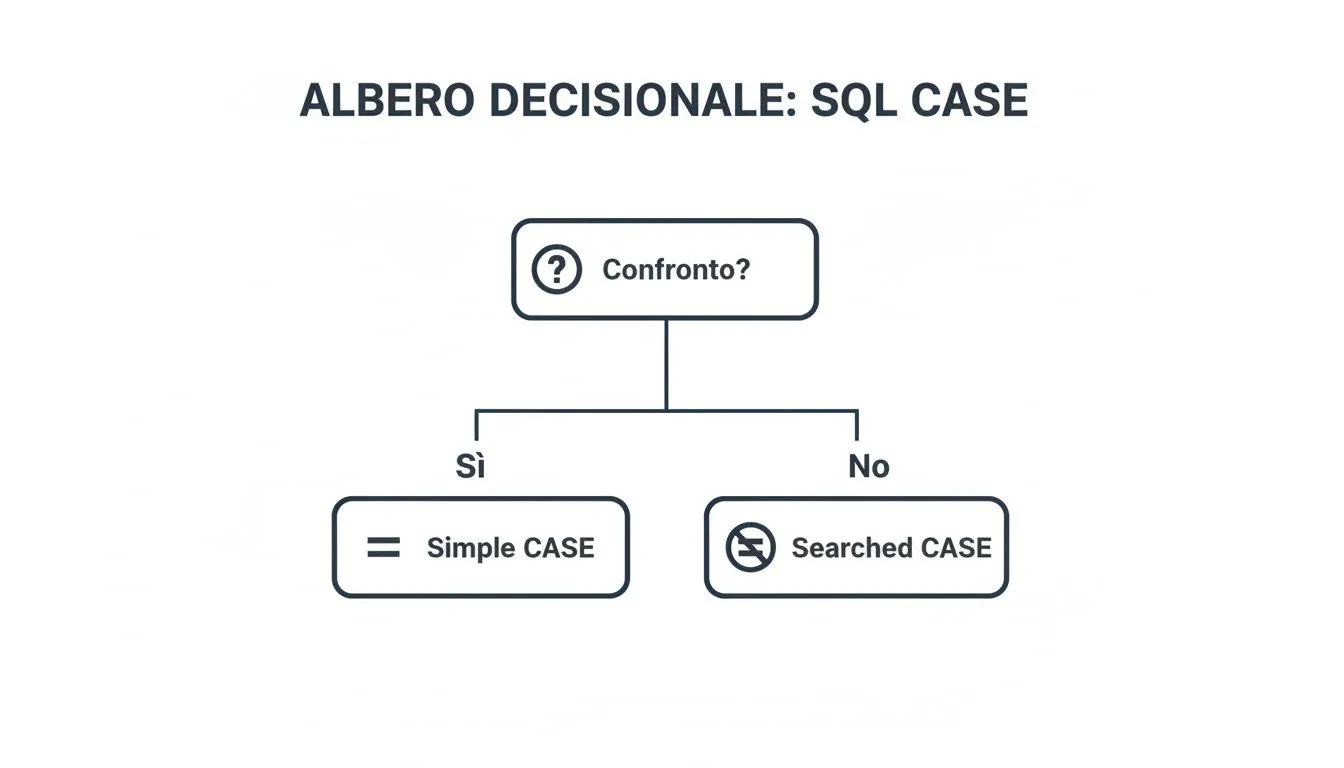
The key concept is simple: if you're checking a single value for equality, Simple CASE it's cleaner. By any other measure, Searched CASE It's the right choice.
When should you use IF/IIF? Use them without hesitation for clear, simple binary conditions. But be careful: as soon as your logic starts requiring an "elseif," go back immediately to the CASE. It's always the best choice for keeping your code readable and easy to maintain over time.
Understanding these dialect-specific alternatives allows you to write code that is not only correct but also optimized for the platform you're using. It strikes the perfect balance between power and simplicity.

The true power of conditional statements in SQL becomes apparent when you apply them to real-world business problems. This is where theory turns into practice. Let’s see how IF, ELSE and above all CASE WHEN go beyond being simple commands to become tools capable of transforming raw data into strategic insights, directly within the database.
We will examine four scenarios that every data analyst or developer encounters sooner or later—from marketing to data management—and show how a CASE WHEN system can automate complex tasks and provide immediate responses.
Imagine you want to segment your customers to launch more effective marketing campaigns. The traditional approach? Export everything to a spreadsheet and start fiddling with formulas and filters. But there’s a much smarter way: create dynamic segments directly within your query SELECT.
This technique allows you to categorize each customer based on their purchasing behavior, such as total spending or the date of their last order. It’s a powerful way to instantly identify your best customers, your loyal customers, and those who are at risk of leaving you.
Practical example:
SELECTID_Cliente,Nome,Spesa_Totale,Ultimo_Acquisto,CASEWHEN Spesa_Totale > 5000 AND Ultimo_Acquisto >= '2023-10-01' THEN 'Cliente Premium'WHEN Spesa_Totale > 1000 THEN 'Cliente Fedele'WHEN Ultimo_Acquisto < '2023-01-01' THEN 'Cliente a Rischio'ELSE 'Cliente Occasionale'END AS Segmento_ClienteFROM Clienti;
With a single query, your data is enriched with context that is essential for your marketing and customer retention strategies. It is one of the cornerstones for building a relational database that truly benefits the business—not just a data repository.
Data quality is everything. Without clean data, any analysis is potentially flawed. Unfortunately, manually entered data is often a mess: inconsistent, riddled with typos, or formatted differently. Using conditional logic in a clause UPDATE allows you to clean and standardize entire datasets with a single command.
This approach isn’t just more efficient than manually correcting thousands of records—it’s a real lifesaver. It ensures consistency and prepares your data for analyses that are finally reliable.
Practical example:
UPDATE AddressesSETState = CASE WHEN State IN ('NY', 'New York', 'new-york') THEN 'New York' WHEN State IN ('CA', 'California', 'cali') THEN 'California' ELSE State -- Leave other states unchanged END WHEN Country = 'USA';
Calculating variable compensation is often a headache. It depends on a myriad of factors: sales performance, length of service, and the achievement of team goals. Instead of managing these complex rules with external scripts or, worse yet, in Excel, you can encapsulate them in an SQL stored procedure.
This not only centralizes business logic, but also ensures that calculations are performed consistently and securely, reducing the risk of manual errors and ensuring transparency.
A stored procedure can take an employee ID as input and return the exact bonus amount by applying a specific logic if else if a comprehensive system based on performance data already stored in the database.
Example of logic (in T-SQL):
CREATE PROCEDURE CalculateEmployeeBonus@EmployeeID INT ASBEGIN DECLARE @YearsOfService INT; DECLARE @AnnualSales DECIMAL(10, 2); DECLARE @Bonus DECIMAL(10, 2);SELECT @YearsOfService = Years_Of_Service, @AnnualSales = Sales_2023 FROM EmployeePerformance WHERE EmployeeID = @EmployeeID; IF @AnnualSales > 100000 SET @Bonus = @AnnualSales * 0.10; -- 10% bonus for top performersELSE IF @AnnualSales > 50000 AND @YearsOfService > 5SET @Bonus = @AnnualSales * 0.07; -- 7% for senior employees with good salesELSESET @Bonus = @AnnualSales * 0.05; -- 5% standard bonus-- Logic to update the table or return the valueSELECT @Bonus AS Calculated_Bonus;END;
Finally, conditional logic can make your reports incredibly dynamic. By using CASE within aggregation functions such as COUNT or SUM, you can create complex metrics with a single table scan.
For example, you can count orders across different categories, sum sales by region, and calculate the total number of pending orders—all in a single query. This eliminates the need to run separate queries for each metric, making reporting scripts much faster and easier to maintain.
Practical example:
SELECT COUNT(CASE WHEN Status = 'Shipped' THEN 1 END) AS Shipped_Orders, COUNT(CASE WHEN Status = 'Pending' THEN 1 END) AS Pending_Orders,SUM(CASE WHEN Region = 'North' THEN Total END) AS North_Sales,SUM(CASE WHEN Region = 'South' THEN Total END) AS South_SalesFROM Orders;

Having conditional logic that works is only half the battle. To be truly effective, it must also be robust and, above all, fast. Two of the most common pitfalls that can derail your analysis are handling NULL values and queries that take forever to run.
NULL values are a strange beast in SQL. Any direct comparison with NULL (such as column = NULL or colonna <> NULL) returns neither true nor false, but a third state: UNKNOWN. This seemingly harmless behavior can create real black holes in your logic if-else-if in SQL, excluding rows you were sure to include and skewing your results.
To avoid falling into this trap, there’s only one solution: handle NULL values explicitly and proactively. Instead of crossing your fingers and hoping the data is clean, you can use specific functions directly within your expressions CASE or IF.
The two most effective weapons in your arsenal are COALESCE and ISNULL.
COALESCE(column, default_value): This is the standard ANSI-SQL function, which means you'll find it practically everywhere. It returns the first non-NULL value it encounters in the list of arguments. It's perfect for replacing a NULL with a safe alternative, such as a zero or an empty string, before your conditional logic even kicks in.ISNULL(column, default_value): Typical of dialects such as SQL Server, essentially does the same thing as COALESCE when you use only two arguments. Be careful, though, because there are small but important differences in how it handles data types.By integrating these functions, your logic becomes fail-safe NULL. Simple and effective.
Choosing the right function to handle NULL values can make all the difference in terms of code portability and performance.
A quick guide to choosing between COALESCE, ISNULL, and NULLIF based on the SQL dialect and specific use case, with practical examples.
COALESCE returns the first non-NULL value from a list of arguments. It is the most flexible and versatile function, supported by all major databases: SQL Server, PostgreSQL, Oracle, MySQL, and SQLite. A typical use case is to return the first available email address from a list consisting of a work email, a personal email, and a fallback value: SELECT COALESCE(work_email, personal_email, 'No email') FROM users.
ISNULL Replaces a NULL value with a specified alternative. It is less flexible than COALESCE because it accepts only two arguments and is available exclusively in SQL Server and T-SQL. A practical example is returning the list price when the discounted price is missing: SELECT ISNULL(discounted_price, list_price) FROM products.
NULLIF returns NULL if two expressions are equal; otherwise, it returns the first one. It is particularly useful for avoiding division by zero and is supported by SQL Server, PostgreSQL, Oracle, and MySQL. A typical example is calculating the average per order while protecting against division by zero: SELECT total_sales / NULLIF(order_count, 0) AS average_order_value FROM report.
In summary, COALESCE is almost always the safest and most portable option. Use ISNULL if you work exclusively with SQL Server and prefer its syntax, and keep NULLIF readily available for specific situations, such as preventing math errors.
A conditional statement, especially when embedded in a clause WHERE...can actually slow down your queries. In fact, sometimes it prevents the database from using the indexes available to it, forcing it to perform a full table scan and slowing everything down.
A query isn't "finished" until it's fast. Optimizing the conditions CASE is not an optional step, but an essential part of writing professional-grade SQL code that doesn't slow down the system.
Here are a few practical tips to ensure that your queries are not only correct but also snappy:
WHEN by probability: Always list the conditions that occur most frequently first. The database engine stops at the first true condition it finds. This simple trick can drastically reduce the amount of work it has to do, especially on very large tables.WHEN. Every line of code must be evaluated, and the more complex the condition, the longer it takes. Simplicity always pays off in terms of performance.WHERE: This is a golden rule. Apply a function to an indexed column in the clause WHERE (for example, WHERE YEAR(order_date) = 2023) is one of the most common ways to "kill" an index. It is much better to keep the columns "clean" and apply transformations on the right side of the join, if possible (WHERE data_ordine >= '2023-01-01' AND data_ordine < '2024-01-01').Theory is essential, but it’s in practice that you win the game. To turn theory into real-world skills, here are your takeaways for writing conditional code that’s not only correct but also efficient, readable, and future-proof.
CASE for portability. As the ANSI-SQL standard, it is the common language of databases. If your logic has more than two possible outcomes, CASE is not just an option—it's the choice that makes your code robust and platform-independent. It's an investment in the future.IF/IIF just for the sake of simplicity (and if you can). These functions are great because of their concise syntax in binary (true/false) conditions. But as soon as the logic gets more complicated and you need an "else if...", ditch them immediately and go back to the clarity and scalability of CASE.NULL. A value NULL unmanaged code can skew your results. Always include explicit handling with COALESCE or with controls IS NULL. It’s like wearing a seatbelt: you might not always need it, but when you do, it saves your life.ELSE. Omit the clause ELSE in a CASE It's like leaving the door open to unexpected results (it will yield NULL). Add a ELSE makes your query's behavior predictable and protects you from unpleasant surprises.CASE. The SQL engine stops at the first condition that evaluates to true. On tables with millions of rows, this simple trick can significantly speed up your queries.By consistently applying these principles, you won’t just be writing queries anymore. You’ll be designing a robust business intelligence solution that can stand the test of time and imperfect data.
Did you notice that, even though there isn't a command IF ELSE IF directly, SQL offers even more powerful and flexible tools. The expression CASE WHEN is your primary tool, a universal standard that allows you to implement complex business logic directly within queries. For simpler cases, functions such as IF and IIF offer a more streamlined syntax.
Mastering these techniques means transforming data from simple records into strategic insights, creating customer segments, cleaning data, and building dynamic reports in an efficient and scalable way.
Now you're ready to take the next step. Don't just query your data—make it speak for itself. Start applying these conditional logic rules today to get smarter answers and drive better business decisions.
Ready to turn your data into a competitive advantage without writing a single line of code? Find out how ELECTE make sense of your data with a free demo.

.svg)


.svg)
.svg)




.webp)