

You receive an XML file via certified email (PEC). You open it in your browser, see a wall of tags, and think the problem is “reading” it. In reality, that’s just the first hurdle. The real problem in your company is something else: figuring out whether that data is correct, consistent, and ready to be included in your reports.
For many Italian SMEs, this issue is no longer strictly technical. Since electronic invoicing became mandatory, XML has become part of the daily work of administration, management control, and analysis. It’s not enough to simply view the document. You need to be able to distinguish between a readable file and a reliable one. You need to understand when a quick check is sufficient and when parsing, validation, and normalization are required before loading the data into Excel, a BI system, or an analytics platform.
If you're looking for a practical guide on how to read XML files, this is the right approach: start with simple methods, figure out where they break down, and then build a workflow that transforms raw XML into data useful for business. That's where you minimize errors and shorten the time between "I have the file" and "I have a usable insight."
An XML file organizes data into a hierarchical structure. There is a root element, nested sections, and each block describes a piece of information with a specific meaning. For those who manage administrative processes, this detail makes the difference between data that is readable and data that is truly usable.
The point isn't to "open" the file. The point is to determine whether that file can be integrated into the control, accounting, and analysis workflows without errors.
Let’s take an electronic invoice as an example. The same file contains supplier data, customer data, taxable amounts, VAT, item lines, payment terms, order references, and often exceptions that make it difficult to read. In XML, this information isn’t listed one after another as it would be in a regular document. It’s placed in specific locations, and that location explains what each piece of information represents.
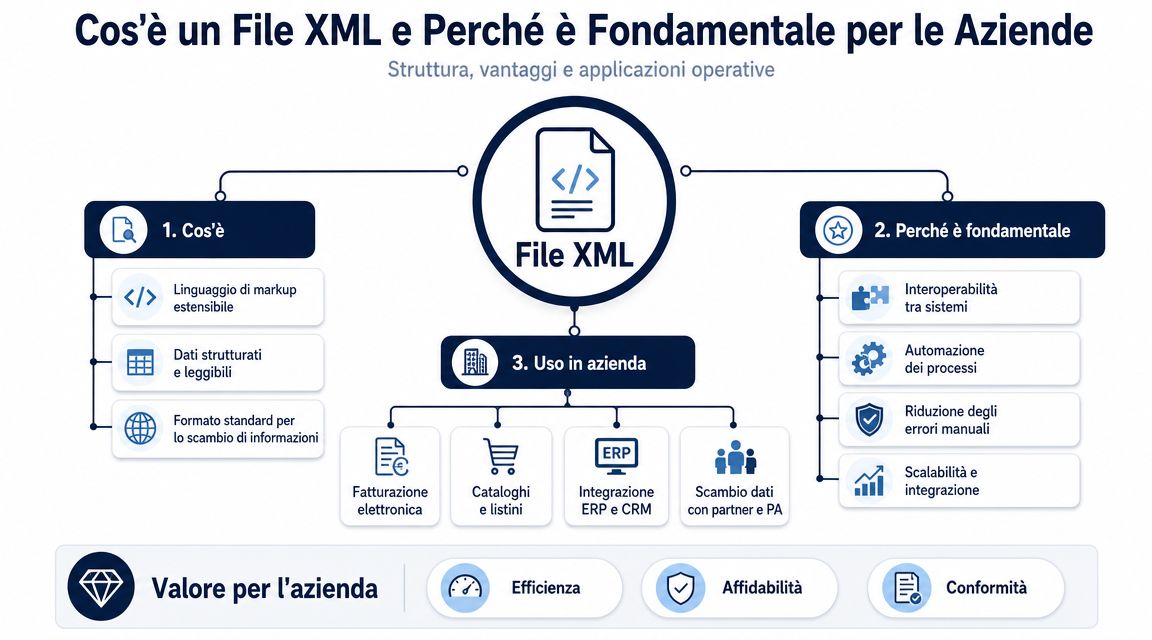
For a manager, the useful distinction is not between tags and attributes in a theoretical sense. It is between isolated data and reliable data. Seeing “1000.00” out of context is of little use. Seeing it in the correct place in the file allows you to understand whether it is the document total, the taxable amount, the tax, or the value of a single line.
This is where the first operational advantage comes into play. XML preserves the context of the data.
Rule of thumb: To properly read an XML file, you need to verify the meaning of the value, not just the value itself.
In Italy, this issue has become a reality with the widespread adoption of electronic invoicing. In the FatturaPA format, XML has become the standard for tax documentation. As a result, interpreting these documents is no longer just an IT matter. It involves administration, management control, procurement, and anyone who needs to use that data to make decisions.
In practice, I always see the same problem. The file exists, the data is there, but the time it takes to turn it into useful information drags on too long. Someone opens the XML file, checks it visually, copies values into Excel, corrects inconsistent fields, renames suppliers listed in different ways, and tries to reconstruct expense categories that the file doesn’t present in a format ready for analysis. The cost isn’t just operational. It’s lost time-to-insight.
With FatturaPA, the risk is even more apparent. Two formally correct files can cause the same analysis problems if one uses very vague line item descriptions, if order references are incomplete, or if supplier master data is entered with different variations. At that point, the problem isn’t reading XML. The problem is preventing valid tax data from becoming unreliable management data.
A common mistake is to treat XML as an attachment to be viewed. In a business setting, it’s better to think of it as a structured data source that needs to be validated before it feeds into reports, dashboards, and expense models. If this step is handled poorly, the finance team ends up discussing numbers that appear accurate but are based on inconsistent classifications.
The right questions to ask at the beginning are these:
These are very practical checks. They help prevent duplicate suppliers in reports, misinterpreted VAT, incompletely populated cost centers, and slow month-end reconciliations.
This is where the gap between technical interpretation and business value becomes apparent. A parser reads the file. A well-designed process produces clean, comparable data that is ready for analysis. Platforms like ELECTE were created to bridge this very gap, reducing the manual work involved in transforming the received XML into insights that enable better decision-making.
For quick checks on a single file, you don’t need parsers or libraries. You need to determine whether you’re performing a visual check of just a few fields or whether you’re already handling data that will end up in accounting, reporting, or management control. The difference matters, especially with FatturePA. A check done hastily today could result in an incorrect row in the supplier dataset tomorrow.
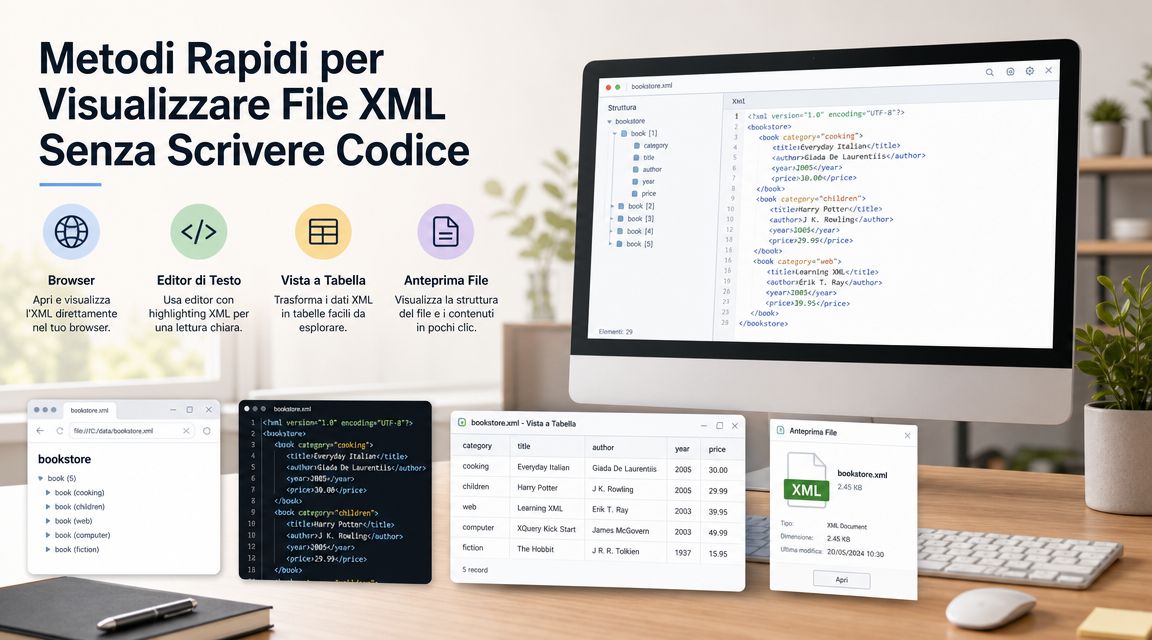
Browsers, text editors, and dedicated viewers solve a specific problem: quickly reading content without setting up a technical workflow. For a single file, this is often enough. You can open an XML file in Chrome, Edge, or Firefox to view its structure, or use Notepad, WordPad, or TextEdit if you want to inspect the tags directly. In the case of electronic invoices, a dedicated viewer makes the header, document lines, taxable amount, and VAT easier to read.
The bottom line is this:
| Tool | Useful for | Main limitation |
|---|---|---|
| Browser | Quick visual inspection of the structure | Does not check for consistency between fields and sections |
| Text Editor | Direct Inspection of Tags | It becomes cumbersome with long or nested files |
| Excel | Preliminary review in tabular format | It handles hierarchies and repetitions poorly |
| Dedicated Viewer | Easier-to-read invoices and tax documents | It does not prepare data for analysis or automation |
If you need to verify the document date, VAT number, invoice total, or whether there are any attachments, these tools are suitable.
If, on the other hand, the goal is to compare suppliers, categorize expenses, or populate a dashboard, simply viewing the data slows down the work and leaves too much room for manual errors. It’s the classic gap between looking at a file and arriving at reliable data in a timely manner.
Opening an XML file does not mean that the data you will use in your reports has been validated.
Another practical consideration concerns volume. Ten files can still be checked manually. Hundreds of FatturePA invoices, however, cannot. In that case, it makes sense to start thinking about a repeatable workflow or tools that can read the content in a structured way—for example, using an API to capture and manage tax documents in an integrated manner.
In Italy, the recurring problem isn't opening a .xml, but figuring out what to do when a .xml.p7m via PEC. It is important to distinguish between simple XML files and digitally signed files. The latter requires tools capable of reading the signature, extracting the content, and displaying the correct XML, as explained by This guide on XML and XML P7M in PEC.
Here, mistakes cost time:
For an administrative assistant, the most useful sequence is simple:
These methods work well for first-level checks. They do not solve the real problem facing the company: transforming tax XML files—which are often irregular or inconsistent—into clean, comparable data without increasing the time it takes to extract useful information from the received document.
When files start to pile up, manual work becomes unsustainable. At that point, reading XML files with code is not an elegant solution. It’s the first step toward avoiding repetitive tasks, copying errors, and inconsistent datasets.
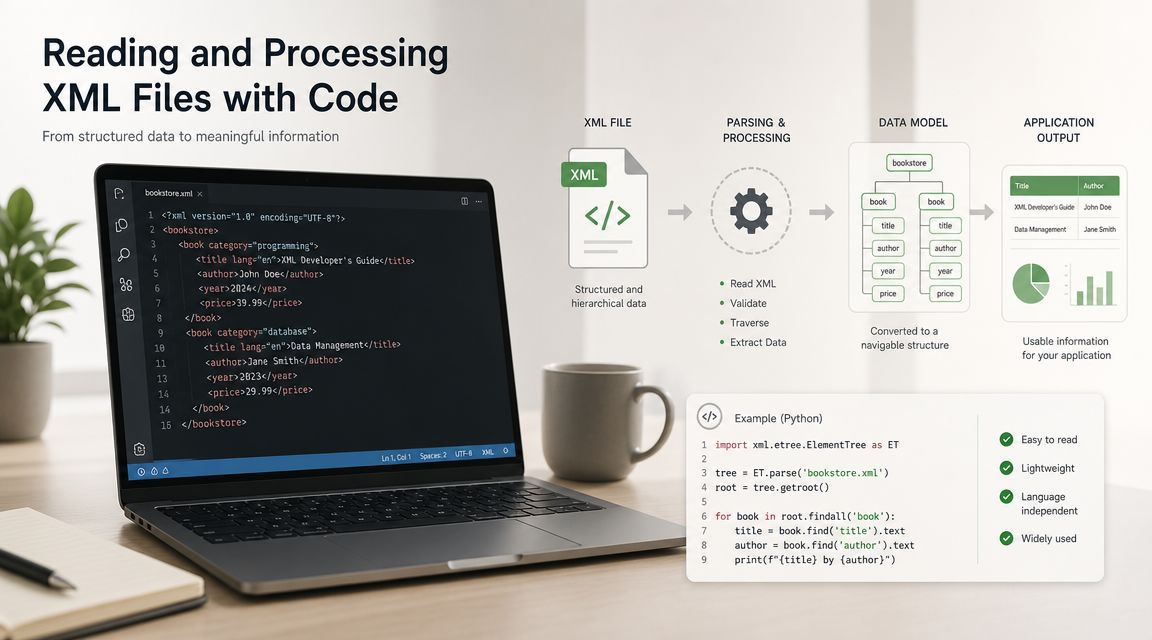
A solid approach to reading XML always follows the same logic: parsing, normalization, and targeted extraction. In Java and Android tutorials, the correct workflow involves parse(), by normalizing the tree with doc.getDocumentElement().normalize() and then by restoring the fields with getElementsByTagName, a more reliable method than simply viewing the file in a text editor, as shown This technical tutorial on reading XML data.
This sequence is more important than the language you choose. If you skip normalization, if you search for nodes in a way that’s too naive, or if you assume that a tag always appears only once, your script will work on some files but fail on the very ones that matter.
For projects that need to interface with external systems, it can be helpful to establish a replicable and well-documented data extraction workflow. If you’re working on application integrations, the ELECTE API documentation —which includes a verified Postman profile—is a useful resource, especially for understanding how to connect a cleaned dataset to subsequent processes.
Below are some simple examples. The goal is not to cover every possible case, but to show you the basic logic: open the file, find a node, and print a value.
import xml.etree.ElementTree as ETtree = ET.parse("invoice.xml")root = tree.getroot()number = root.find(".//Number")if number is not None:print(number.text)Python is often the fastest choice for prototyping, data transformations, and lightweight pipelines. It's great when you need to read a lot of XML files, extract a few fields, and save them as CSV or JSON.
const xmlString = `<fattura><Numero>123</Numero></fattura>`;const parser = new DOMParser();const xmlDoc = parser.parseFromString(xmlString, "application/xml");const numero = xmlDoc.getElementsByTagName("Numero")[0];console.log(numero.textContent);This approach is useful for quick on-page tests or small internal tools. It works well for lightweight interfaces, but less so for structured back-office workflows.
const fs = require("fs");const xml2js = require("xml2js");const xml = fs.readFileSync("fattura.xml", "utf8");xml2js.parseString(xml, (err, result) => {if (err) throw err;console.log(result.fattura.Numero[0]);});If you work on the server side and want to build automations, Node.js remains a practical choice. The advantage is that it allows you to easily integrate XML parsing with the file system, processing queues, and internal services.
DocumentBuilderFactory factory = DocumentBuilderFactory.newInstance();DocumentBuilder builder = factory.newDocumentBuilder();Document doc = builder.parse("fattura.xml");doc.getDocumentElement().normalize();NodeList lista = doc.getElementsByTagName("Numero");if (lista.getLength() > 0) {System.out.println(lista.item(0).getTextContent());}Java is often used in enterprise, business management, and middleware contexts. The key point here is not just to read the data, but to do so in a predictable and maintainable way.
library(XML)doc <- xmlParse("fattura.xml")numero <- xpathSApply(doc, "//Numero", xmlValue)print(numero)R makes sense when parsing is part of an analytical task. If your next step is statistical analysis or data preparation, you can keep everything in the same environment.
If your team opens the same files every week and performs the same checks, you're already in the realm of automation.
The real benefit isn't "reading XML with code." It's freeing people from repetitive work and building a workflow that produces consistent datasets.
The real problems begin when there is more than one file. A single FatturaPA is almost always manageable. The difficulty arises when you have to consolidate months’ worth of documents, different suppliers, inconsistently filled-out fields, and embedded attachments.
In Italian SMEs, the most common scenario is not an isolated “mega file,” but a batch. An annual export of purchase invoices can result in a structure with over 380,000 nodes across 4,200 invoices, including headers, line items, payment details, and base64-encoded attachments. In these scenarios, the challenge isn’t opening the document; it’s transforming heterogeneous XML into a coherent dataset.
This is where a technical choice comes into play that has business implications. In the .NET environment, Microsoft notes that `XmlDocument` loads the document into memory and is useful for reading and editing, while for large files or read-only operations, it is advisable to opt for more efficient approaches such as streaming parsers or `XPathDocument` to avoid excessive RAM consumption, as specified in Microsoft’s documentation on reading XML with `XmlDocument` and `XPathDocument`.
In practice:
The trade-off is simple. The in-memory model lets you develop faster. The streaming model performs better in production when there are many files or large files.
Many teams stop at XSD validation. It's useful, but it's not enough. A file can comply with the schema and still produce dirty data downstream.
Typical examples from day-to-day operations:
| Type of inspection | What it checks | Why is it needed? |
|---|---|---|
| Structural | Tags, format, hierarchy | Avoid parsing errors |
| Semantic | Logical Consistency of Data | Avoid incorrect analyses |
| Operational | Presence of fields useful for reporting | Avoid unusable datasets |
The most insidious case is this: a “Total Document Amount” that is formally valid but does not match the sum of the line items, perhaps due to rounding rules in the supplier’s accounting system. Or VAT codes that are formally valid but do not match the nature of the transaction.
Even a formally correct file can still skew your reporting.
There is also another well-known pitfall in FatturaPA. The *DatiBeniServizi* tag contains free-form descriptions. The same cost can appear in many different ways, with text that is clear, abbreviated, or cryptic. If you don’t include a normalization step, any analysis by expense category becomes unreliable.
That's why, in serious data flows, reading the file is only the first step. The second step is always a set of consistency and cleaning rules. That's where data quality is safeguarded—not in the parser.
An XML file that reads correctly is not yet a useful dataset. It is a structured document. To perform analyses, comparisons, groupings, and create dashboards, you almost always need to convert it into a format that is easier to work with.
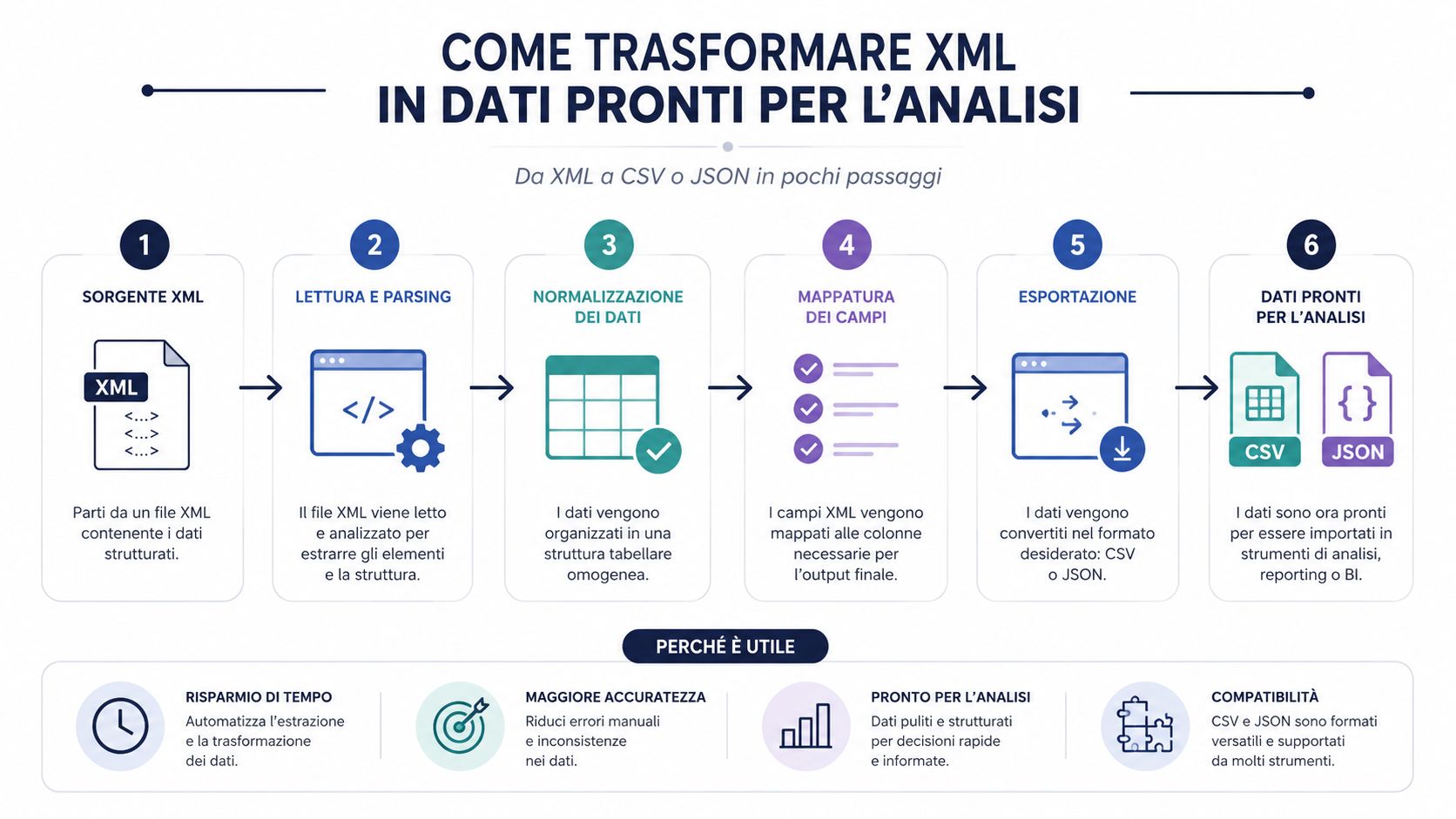
This is the point that many processes overlook. The bottleneck is rarely the parsing itself. A decent library can read XML quickly. Time is lost in interpreting the structure, extracting useful fields, cleaning the data, normalizing it, and loading it into an analytics tool.
That's why converting to CSV or JSON isn't just a convenience. It's a key operational step. If you skip this step and work directly on the raw file, you almost always end up with manual checks, improvised columns, and logic that's difficult to replicate.
A useful resource for anyone who frequently works with XML and spreadsheets is this guide on how to convert XML to Excel in a more organized way.
The right format depends on how you'll use the data later.
CSV works well when you want one row per document or one row per invoice line item, and then use Excel, Power Query, or BI.
Python example:
import xml.etree.ElementTree as ETimport csvtree = ET.parse("invoice.xml")root = tree.getroot()with open("invoices.csv", "w", newline="", encoding="utf-8") as f:writer = csv.writer(f)writer.writerow(["number", "date"])number = root.findtext(".//Numero")data = root.findtext(".//Data")writer.writerow([numero, data])The advantage is simplicity. The limitation is that you have to carefully decide how to flatten the hierarchy. If an invoice has multiple detail lines, you need to make a clear choice regarding granularity and the join key.
JSON is best suited when you want to preserve part of the hierarchical structure.
JavaScript example:
const record = {numero: "123",data: "2024-01-15",righe: [{ descrizione: "Servizio", importo: "100.00" }]};console.log(JSON.stringify(record, null, 2));Use it when your next step is an API, a data lake, or an application that works well with nested objects.
Here's a helpful rule of thumb:
The XML file is the container. CSV and JSON are the formats that make the content truly usable.
If you want to reduce time-to-insight, this is where you should focus your efforts. Not on finding a more user-friendly visualizer, but on defining a stable and repeatable transformation.
Once the file has been read, validated, and transformed, the nature of the work changes. You’re no longer struggling with tags. You’re finally focusing on costs, anomalies, suppliers, expense categories, and operational trends.
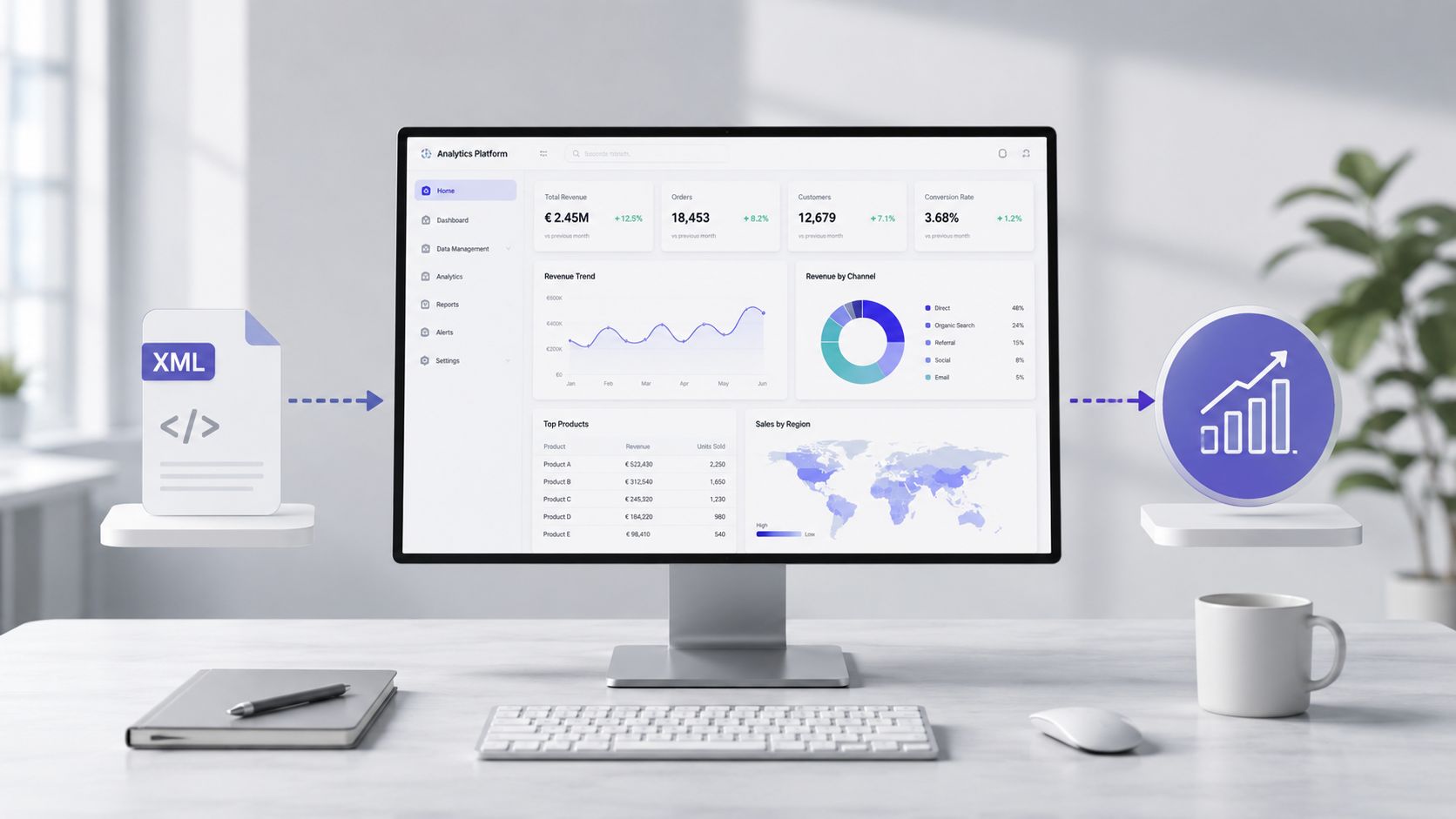
In the real world, the value isn't in the parsing time. It's in the time it takes to go from the raw file to information you can act on. With a manual workflow, a person has to open the document, understand its structure, extract the fields, clean up the values, normalize the text, and then build reports. It's a fragile process.
A classic example in FatturaPA is the free-text field in DatiBeniServizi. The same service can be described in many different ways by different suppliers. If you import that data without a consistent mapping, the analysis by cost category produces meaningless aggregations.
For this reason, before implementing the analytics platform, a data preparation layer is needed:
When this step is done right, any analytics platform works better. If you want to delve deeper into the decision-making and visual aspects of this step, the resource on how to build stories with data is helpful because it shows how a clean dataset can be turned into a narrative that’s useful for decision-makers.
At this point, the XML file ceases to be a technical issue and becomes raw material for insights. A well-prepared dataset can support expense analysis, trend monitoring, identification of variances, and review of exceptions.
To choose a platform suited for this "last mile," it may help to compare what modern business analytics software offers versus purely manual workflows based on spreadsheets and pivot tables.
The right criterion here isn't "Can it open XML?" That's the bare minimum. The relevant question is a different one:
| Question | Why it matters |
|---|---|
| The data is already in clean format | Avoid drawing specific insights from incorrect data |
| The categories are consistent | Do you really compare suppliers and time periods? |
| Anomalies become apparent right away | Reduce the time spent on manual checks |
| The report is accessible to business and finance professionals | Speed up decision-making |
The difference between an immature and a mature process does not lie in the ability to read XML files. It lies in the ability to transform them into a reliable database that does not force the team to redo the same work every time.
If you need to read XML files in a way that's useful for your business, keep this checklist in mind. It's more practical than any technical definition and helps you choose the right method without wasting time.
Don't always use the same approach. Browsers, editors, and viewers are fine for quick checks. Parsers and scripts are needed when the file must feed into repetitive processes. If you confuse data visualization with data processing, you run the risk of building reports on a shaky foundation.
The files .xml.p7m require a specific step in signature management. If the content comes from a PEC, this check is not optional. It is part of the proper processing of the document.
Adhering to a schema does not guarantee a clean dataset. Logical inconsistencies—such as mismatched totals or ambiguous tax classifications—are what most often ruin an analysis. Semantic validation is what distinguishes an “acceptable” file from reliable data.
CSV and JSON aren't just cosmetic changes. They're what make XML usable by analytics tools, spreadsheets, pipelines, and reports. The sooner you define this transformation, the sooner you'll reduce manual work and improvisation.
Your goal isn't to read XML files. It's to gain useful insights without cluttering the system with dirty data. If the data flow doesn't produce a consistent dataset, the problem isn't with the final dashboard. It lies much further upstream.
Basically, you can use this mini-checklist before starting any new project:
If you want to turn prepared data into clear, actionable insights, ELECTE helps SMEs move from a clean dataset to intelligent reporting, using an approach that’s accessible even to non-technical teams. It’s the fastest way to bridge the gap between operational data and decision-making.

.svg)


.svg)
.svg)
.webp)