You’re likely dealing with a very specific situation. You need competitive pricing data, listings, reviews, catalogs, public data, or content from vertical portals. The alternatives are almost always the same: manual copy-and-paste, incomplete exports, limited APIs, or data scattered across pages that no one in the company can consistently gather.
This is where a Python web scraper stops being a technical exercise and becomes an operational asset. Python is the most practical choice when you want to turn web pages into clean datasets, because it allows you to start with simple scripts and then move on to more advanced crawlers, browser automation, and analysis pipelines.
In the Italian context, this issue is even more relevant. Python has become the standard for automation and data analysis, and web scraping is one of the most widely used applications in companies. The real difference, however, isn’t made by those who simply “download data.” It’s made by those who know how to choose the right library, avoid common mistakes, comply with GDPR and terms of use, and deliver data that the business can read and use.
Many early web scraping projects start with a simple need: keeping an eye on a competitor’s prices, collecting headlines from an industry portal, building a product list, or monitoring calls for bids or job postings. The problem isn’t finding the data. The problem is collecting it in a way that’s repeatable, clean, and reliable enough to use in decision-making.
A Python web scraper solves exactly this problem. It allows you to visit a page, download its content, identify useful elements, and save them in a structured format. If you set it up properly from the start, you can turn a manual and error-prone task into a reliable workflow.
The part that tutorials often skip is the most important part of the actual work. It’s not enough to just “do some scraping.” You have to choose the right level of complexity. Requests and BeautifulSoup are sufficient for many sites. Others require Selenium or Playwright because the content is generated by JavaScript. For larger projects, Scrapy comes into play. And when the data involves people, profiles, or contact information, you also need to follow specific legal guidelines.
A good scraper isn't the one that extracts the most data. It's the one that extracts the right data at the lowest maintenance cost.

Python dominates this field for a practical reason. It allows you to move very quickly from an idea to a working script, without having to make too many compromises as the project grows. In the Italian market, this is not merely a technical preference. According to 2023 data from the Digital Innovation Observatory at the Politecnico di Milano, Python is used by 75% of Italian companies for data analysis and automation, with web scraping among the primary applications. Along the same lines, in 2022, 40% of Lombardy-based SMEs implemented Python scrapers to monitor competitor prices, resulting in a 25% increase in competitiveness in retail, as reported onthe University of Texas’s reference pageon scraping with Python.
Python’s greatest strength is its readability. Whether you need to explain a script to a colleague, debug HTML selectors, or modify the extraction logic in two weeks’ time, the clarity of your code matters more than you might think.
The second strength is the ecosystem. There are mature libraries available for almost every level of development:
This is where many beginners go wrong. They see Selenium and assume it’s always the best solution. It isn’t.
For a static page, using a full-featured browser means consuming more resources, writing slower code, and increasing the number of potential failure points. Conversely, using only Requests on a site that loads data via JavaScript leads to a classic outcome: nearly empty HTML and no useful data.
It makes sense to think of it this way:
Rule of thumb: Always choose the simplest tool that can actually read the data you need.
Another advantage of Python is that this transition is gradual. You don’t have to rewrite everything from scratch every time. Often, you can keep the parsing logic and just change how you retrieve the page.
The most practical way to choose a library isn’t to ask which one is “the best.” The right question is a different one: what kind of site do I need to build, how long will this project last, and how much maintenance can I handle?
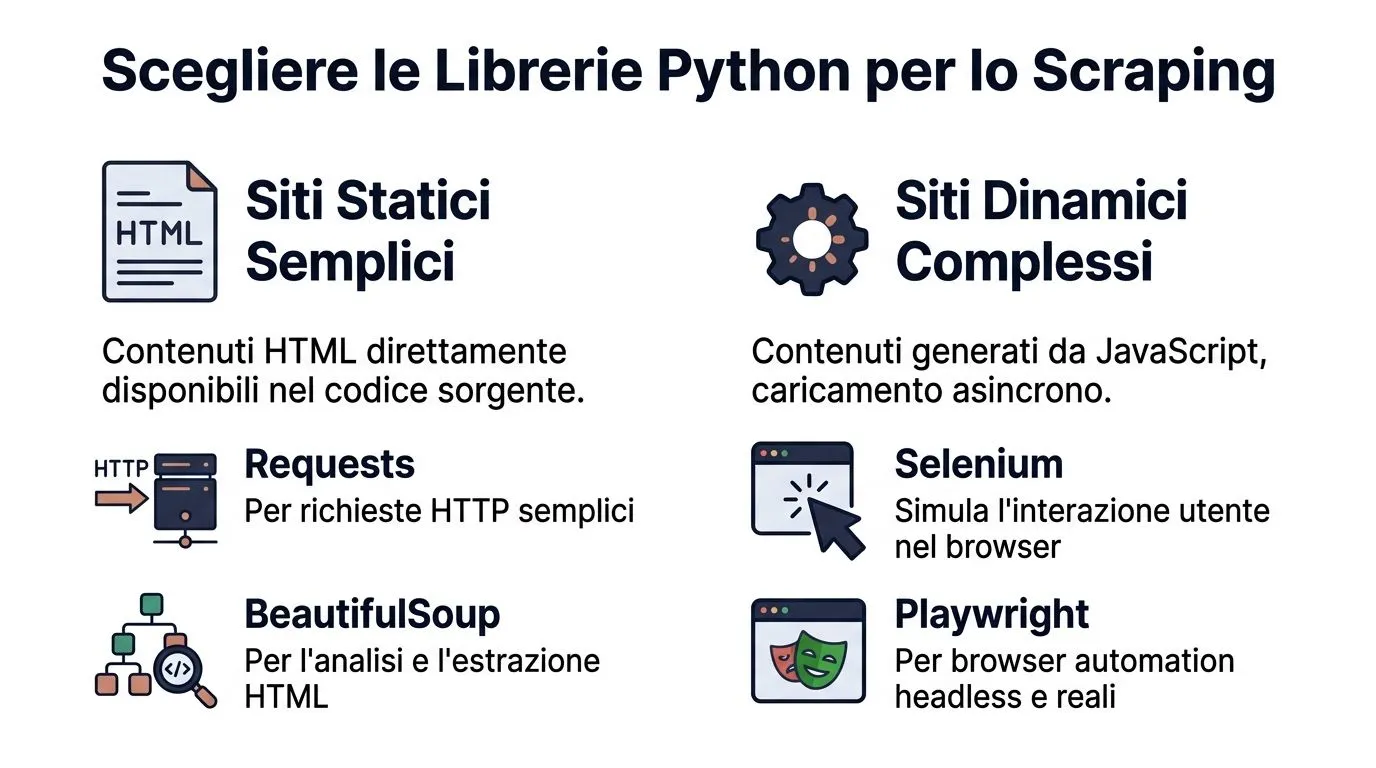
A 2025 report by Unioncamere Lombardia indicates that many tech companies in Lombardy use Python for web scraping, contributing significantly to the region’s economic value. In the same context, Scrapy has a 45% adoption rate among Italian developers, and Selenium is used in 55% of projects requiring interaction with JavaScript sites, with a 90% reduction in CAPTCHA blocks when combined with proxies, according to ScraperAPI’s reference page dedicated to scraping with Python.
If the content is already in the original HTML, don't make things harder for yourself.
Requests + BeautifulSoup is still the most sensible starting point for:
This stack is great when you want to:
A simple example:
import requests from bs4 import BeautifulSoup url = "https://example.com/news" response = requests.get(url, timeout=20) response.raise_for_status()soup = BeautifulSoup(response.text, "html.parser")for article in soup.select("article"):title = article.select_one("h2")link = article.select_one("a")if title and link:print(title.get_text(strip=True), link.get("href"))
This approach works well as long as the data is actually in the HTML source. Before using it, open “View Page Source,” not just “Inspect.” If the data isn’t in the source, Requests alone won’t be enough.
If you see asynchronous loading, “load more” buttons, infinite scrolling, content generated by front-end frameworks, or mandatory user interactions, then the HTML parser alone won’t solve the problem.
This is where Selenium and Playwright come into play.
Selenium is a stable and widely used choice. It's a good option when you need to:
Playwright tends to offer a more modern and streamlined API. If you're just getting started today, many teams find it more straightforward for:
The reality is this: browser automation offers more power, but it also means higher memory usage, longer processing times, and more maintenance.
If you can read a JSON endpoint from network traffic, do so. It's almost always more reliable than simulating clicks and scrolls.
There comes a point where you’re no longer just “scraping data.” You’re building a process.
This is where Scrapy gets interesting. Not because it’s easier, but because it organizes things better:
I recommend it when you need to work with many categories, many pages, or multiple domains that follow recurring patterns. For a one-time data extraction, it’s often overkill. For a continuous crawler, however, it saves you from having to reinvent components that you would otherwise have to spread across separate scripts.
You can also use a hybrid approach:
LibraryIdeal Use CaseJavaScript ManagementLearning CurveSpeedRequestsStatic pages, APIs, rapid prototypingNoLowHighBeautifulSoupSimple, readable HTML parsingNoLowMediumSeleniumBrowser interaction, forms, clicks, dynamic sitesYesMediumLowPlaywrightModern dynamic sites, more robust handling of delaysYesMediumMediumScrapyLarge-scale crawling, structured processesNot native, requires extensionHighHigh
The first version of a scraper should do a few things well: read a page, find the right elements, clean up the text, and save the output in a useful format. Nothing more.

Keep the project isolated. A virtual environment prevents conflicts and makes the work reproducible.
Install only what is necessary:
pip install requests beautifulsoup4
Basic initial structure:
scraper.py for the codeoutput.csv for exportIt may seem obvious, but documenting the selectors you use right from the start will save you time when the site changes.
Open the target page in your browser and use the developer tools. Look for the nodes that actually contain the data you're interested in.
Suppose we want to extract:
Check three things:
Don't choose fragile selectors, such as classes automatically generated by the frontend. If you can select a article, a h2 or an area with a consistent structure, your scraper will last longer.
Here is a complete and easy-to-read example.
import csvimport requestsfrom bs4 import BeautifulSoupfrom urllib.parse import urljoinBASE_URL = "https://example.com"TARGET_URL = "https://example.com/news"headers = {"User-Agent": "Mozilla/5.0"}response = requests.get(TARGET_URL, headers=headers, timeout=20)response.raise_for_status()soup = BeautifulSoup(response.text, "html.parser")rows = []for card in soup.select("article"):title_el = card.select_one("h2")link_el = card.select_one("a")if not title_el or not link_el:continuetitle = title_el.get_text(strip=True)link = urljoin(BASE_URL, link_el.get("href", "").strip())if title and link:rows.append({"titolo": title,"url": link})with open("output.csv", "w", newline="", encoding="utf-8") as f:writer = csv.DictWriter(f, fieldnames=["titolo", "url"])writer.writeheader()writer.writerows(rows)print(f"Elementi estratti: {len(rows)}")
For a first web scraper in Python, this structure is more than enough.
The flow is linear:
Data quality is determined here. The most common issues aren’t technical. They’re operational:
Before submitting the CSV file, be sure to open it. If the file will be imported into Excel, you should check that the columns and text are legible. If you need help with this step, this guide from ELECTE how to handle CSV files in Excel may be useful.
A scraper that generates a messy CSV file just shifts the problem downstream. It doesn't solve it.
Good habits to start practicing right away:
strip() to clean up the text.urljoin.raise_for_status().If the result seems fragile to you, it is. Before adding new features, make sure the foundation is solid.

When a scraper returns a nearly empty page, the problem is usually not Python. The problem lies in the site’s rendering model. Many modern interfaces load data after the initial HTML, using asynchronous requests or JavaScript components. Requests downloads the initial document. It does not act like a browser.
Before switching to Selenium or Playwright, take a quick look at the developer tools:
If you can find a clean, readable endpoint, that’s often the best approach. You get more structured data, less HTML clutter, and less maintenance.
If, on the other hand, the site actually builds the content in the browser, it uses browser automation. In that case, you need to handle timeouts correctly. The right approach isn’t “wait 5 seconds and hope for the best.” It’s to wait for the element to appear or for an observable condition to be met.
Many websites block aggressive scraping to protect their infrastructure, data, and user experience. If you send too many requests, use unnatural headers, or repeatedly open browser sessions, the website will take action.
The most common mistakes are always the same:
The professional approach is more understated:
It’s not worth pursuing every anti-bot measure as a technical challenge. If the site is clearly hostile to scraping, consider whether the data can actually be obtained in a sustainable and compliant manner.
Building resilient web scrapers means reducing friction with the site, not winning a race against its defenses.
The most overlooked aspect of web scraping projects isn’t the parser. It’s liability. In the Italian context, this becomes much more significant when the data involves individuals, professional profiles, résumés, contact information, or data from job portals.
According to AGID 2025 data, several Italian SMEs have been fined for violations related to the scraping of EU data, with a significant number of penalties imposed in Lombardy and Veneto in 2024–2025. The same source notes that scraping personal data from job portals may entail criminal liability under Article 167 of Legislative Decree 196/03. This reference appears in Real Python’s practical guide to web scraping.
This is the first misconception we need to clear up. Just because data is available online doesn’t mean you can collect, combine, store, and reuse it without restriction.
In any serious work, at least four elements must be checked:
To help you navigate consent, data collection, and compliance, this in-depth article by ELECTE cookies and online privacy, EU vs. U.S. regulations, Google Consent Mode, and consent management is also helpful.
If you need to build a web scraper at your company, this foundation is non-negotiable:
The point here isn't to become lawyers. It's to work like professionals. A well-written scraper isn't just efficient. It's also defensible.
Many projects come to a halt too soon. The team manages to scrape the data, saves a CSV file, and maybe updates the file once a week. Then the process stops there. Without data cleansing, historical analysis, reporting, or forecasting, the value remains limited.
Here is the relevant passage:
If you work in retail, this might involve tracking competitors’ prices and promotions over time. In finance or compliance, it might involve supplementing controls and monitoring lists with data from public sources. In marketing, reviews and editorial content can inform qualitative rankings and trend analysis.
When data collection becomes a recurring process, it’s best to connect the scraping tool to an analytics system rather than a folder of local files. For those who need to integrate data collected from external sources into a broader ecosystem, it may also be helpful to see how ELECTE API integration using a verified Postman profile.
The principle is simple. Web scraping gathers raw data. The value emerges when that raw data is incorporated into a decision-making process.
Building a good web scraper means making sensible choices. The right tool for the right website. Stable selectors. Clean output. Controlled request rate. Legal compliance from the start.
This is why a Python-based web scraper remains one of the most useful tools for analysts, digital teams, and small and medium-sized businesses. It allows you to turn the web into a practical source of data, without having to rely solely on manual exports or limited integrations.
The bottom line, however, isn’t the data extraction itself. It’s how the data is used. If you link the collected data to reports, trends, alerts, and historical data, data scraping ceases to be a technical task and becomes a concrete tool for decision-making.
You’ve already collected the data. The next step is to turn it into clear, actionable insights. With ELECTE, an AI-powered data analytics platform for SMEs, you can connect different sources, prepare data more quickly, and get reports and analyses that truly help your business make decisions. If you want to go from raw data to faster decision-making, it’s worth seeing how it works.

.svg)


.svg)
.svg)