
Take a look at this month’s sales report. Revenue seems to have gone up, the margin appears to have improved, and yet there’s that nagging feeling that something isn’t quite right. It’s not paranoia. It’s operational experience. Anyone who works at an Italian SME knows that between the ERP system, Excel exports, and manual adjustments, the data goes through several transformations before it reaches a dashboard.
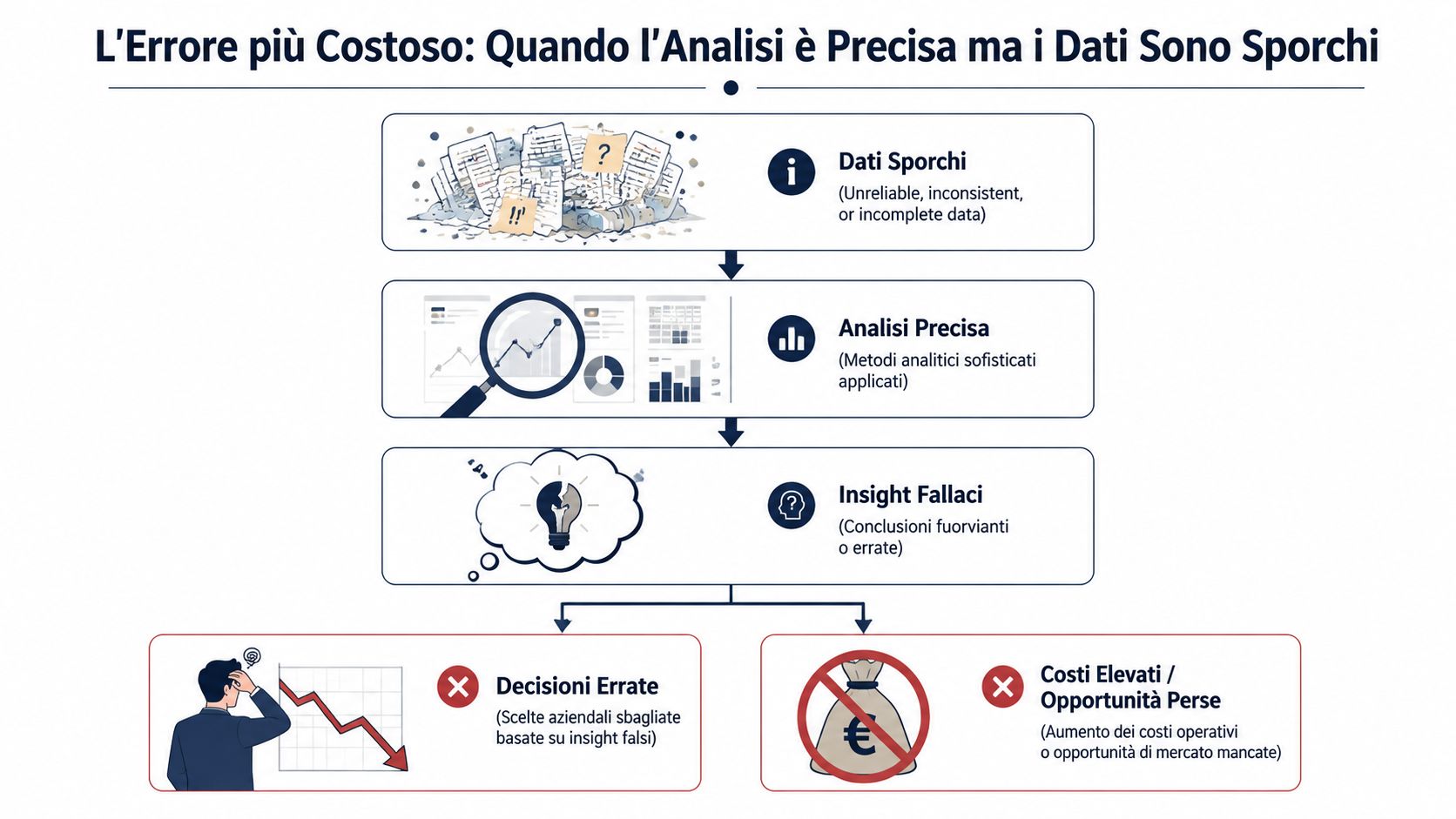
The point is simple: a flawless analysis based on incorrect data won’t help you. It misleads you. It gives you a precise, elegant, reassuring answer—but one built on shaky ground. And that’s far more dangerous than an incomplete report, because it leads you to make decisions with confidence when there’s no basis for that confidence.
Data validation techniques serve precisely this purpose: to bring errors to light. They don’t make the data “perfect.” They reveal problems that are currently going unnoticed. Whether you manage administration, management control, sales, or operations, this is the work that distinguishes a usable number from a mere figurehead. And in SMEs, it’s more valuable than many “advanced” analytics initiatives, because the benefits are immediate—often starting with the very first data import.
In SMEs, numbers rarely originate where they are viewed. They move from an accounting system to an exported file, then to Excel, and then to a version “tweaked” by someone who was supposed to correct just two columns but ended up rewriting half the spreadsheet. When the final report isn’t convincing, the problem often isn’t the chart. It’s everything that happened before.
Data validation is the least appealing yet most important aspect of the entire analytical cycle. No business owner wants to discuss format checks or missing required fields. Yet nearly every wrong decision made based on seemingly clean dashboards stems from there—from a changed decimal separator, a misinterpreted date, a duplicate in the master data, or a total that doesn’t add up but that no one checked.
People who work effectively with data develop a specific habit: before asking what the numbers say, they ask whether those numbers are trustworthy. The best data validation techniques aren’t necessarily the most sophisticated ones. They’re the ones that catch the most common errors early on, without slowing down day-to-day work.
If you don't trust the data enough to make an important decision, the problem isn't the decision itself. It's the validation.
The typical mistake isn't a report that's obviously flawed. It's a well-organized report, seemingly coherent, based on data that has already lost its reliability. When this happens, the damage isn't just in the incorrect number. It lies in the fact that no one questions it.
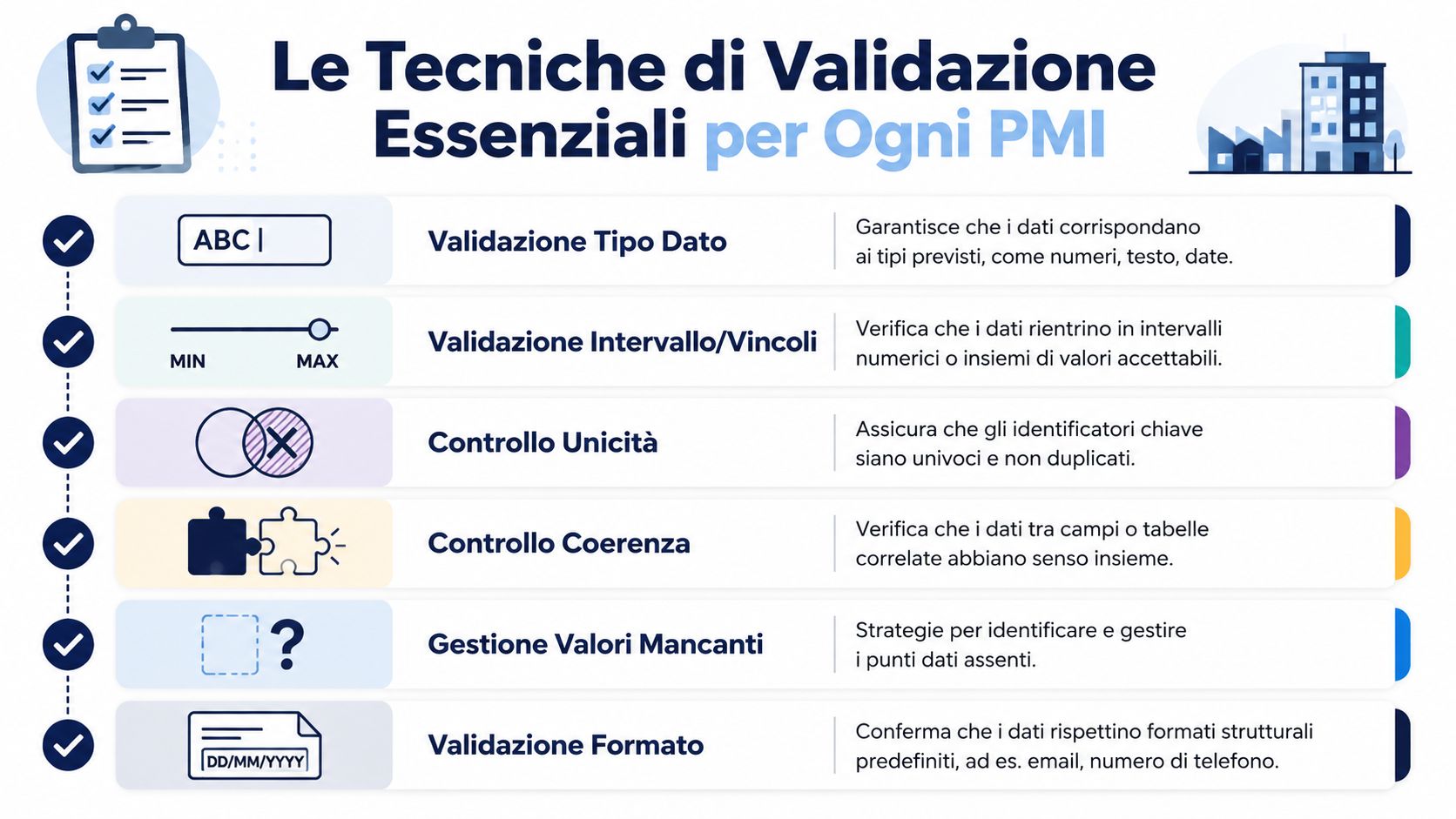
The field has evolved significantly. Data validation has shifted from primarily manual checks to automated and statistical checks. Best practices identify at least five basic checks—namely , data type checks, code checks, range checks, format checks, and consistency checks—as summarized by Teradata in its overview of data validation. In Italy, this evolution carries even greater weight in regulated environments, where even a single incorrect field can skew reports, predictive models, or regulatory compliance.
The first mistake is to stop at the surface. Many companies perform only the most basic check—the syntactic one.
A properly written tax ID number can clear the first hurdle but fail the second. An invoice total can be a number in the correct format, but if it doesn't match the sum of the line items, you have a much more serious problem than just a formatting issue.
Rule of thumb: A validation rule that checks only one column finds trivial errors. A validation rule that checks multiple fields together finds errors that affect decisions.
Effective validation doesn't happen at the end of the process. It happens earlier. If you wait for the final report, the error has already been processed, aggregated, copied into other files, and discussed in meetings. At that point, correcting it costs attention, time, and credibility.
This is even more true when you start using more sophisticated methods, such as anomaly detection or statistical outlier management. These are useful tools, but they are no substitute for basic checks. If a column imported as text contains prices, you don’t need a complex model. You need a simple filter that catches the error at the source.
Good analysis doesn't start with the most visually appealing dashboards. It starts with data that has passed a series of sensible tests as soon as it enters the workflow.
In the day-to-day operations of small and medium-sized enterprises, most of the value comes from simple controls—not from the most sophisticated academic techniques, nor from elaborate pipelines that no one will maintain, but from clear, repeatable rules that are applied right at the point where the data actually enters the company.
In the Italian context, this approach is in line with ISTAT’s methodology, which defines data quality through dimensions such as accuracy, consistency, and completeness, and uses the VIMO (Valid, Invalid, Missing, Outlier) check to measure valid, missing, and outlier values. The approach involves validation at the point of entry, during data transformation, and prior to the final use of the data, as explained in ISTAT’s materials on data quality and validation.
The typical process is always the same. The data is generated in the management system. It’s exported. It’s transferred to Excel. Someone corrects a header, drags a formula, copies a column, or changes the date format “to fix it.” From that point on, the silent errors begin.
Here are the controls you should turn off right away:
If you work with manual exports, you can start with a very straightforward grid:
| Check | A Common Mistake in SMEs | A question to ask yourself |
|---|---|---|
| Type | Price as text | Can this column be calculated? |
| Format | Mixed dates across different formats | Does the system always interpret it the same way? |
| Range | Amounts Outside the Scale | Is this value plausible for a customer or a product? |
| Uniqueness | Customer entered multiple times | Am I counting different people or names spelled differently? |
| Completeness | Empty required fields | Can I use this record in reports and decisions? |
| Consistency | The Totals Don't Add Up | Do the columns corroborate each other? |
For those working in sectors where document and procedural quality already plays a significant operational role, it is worth exploring more structured qualification and control practices as well. A useful resource is the Guide to Qualification in Regulated Sectors, as it clearly demonstrates that validation is not merely about “tidying up,” but rather about process control.
Duplicates deserve a separate mention. They are a chronic problem in the customer databases of many small and medium-sized businesses and skew almost everything: active customers, purchase frequency, market exposure, and relationship history. If you want to start with a real-world example, you’ll find a practical approach in ELECTE: the Complete Guide to Excel Duplicates.
Sophisticated controls are only useful once you've laid the groundwork. Otherwise, it's like putting a radar on a car without brakes.
Monday morning, sales meeting. The owner is looking at the sales report, the administrative manager is looking at another file, and the controller has a third one. The numbers should match. They don't.
This is a common scenario in Italian SMEs. An outdated business management system exports CSV files with fixed fields. The CRM uses different labels. The e-commerce platform has its own logic. Then comes Excel, which becomes the place where someone adjusts headers, copies columns, corrects dates, and tries to make everything add up before the meeting.
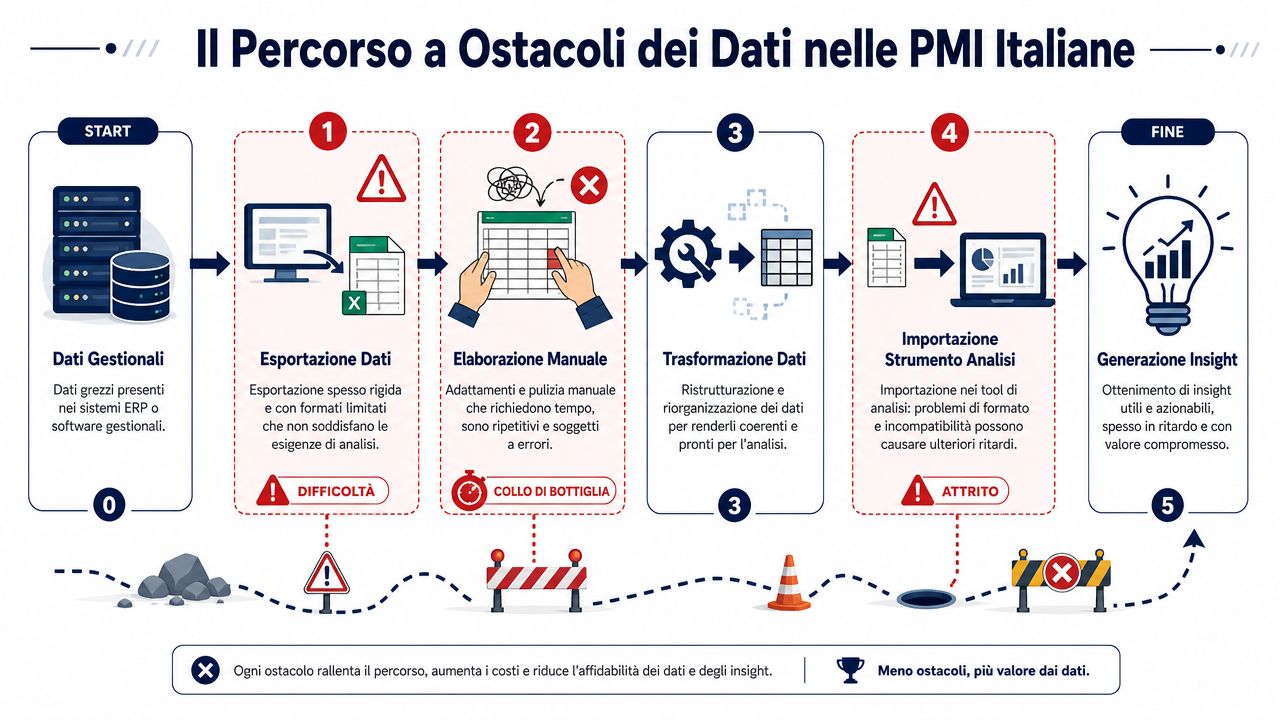
The problem isn't the technology itself. The problem is the accumulation of small manual steps involving data that comes from systems created at different times, often without a common set of rules. Anyone who works with connecting different data sources sees this right away: each source brings with it its own conventions, recurring errors, and fields filled out "haphazardly."
Even the most costly errors don't stop the process. They get into the file and stay there.
It happens every day in very real-life situations:
Many companies make the same mistake here. They look for sophisticated solutions before securing the basic but profitable controls: correct data types, consistent keys, preserved codes, and dates that are interpreted the same way by all systems.
In SMEs, data is rarely clean and consistent from the start. It passes through administration, sales, logistics, external consultants, and local files with names like "report_finale_def_vero.xlsx." Each person edits the parts they need for their work. Almost no one documents the changes.
That’s why academic checks or overly ambitious anomaly detection projects often come too late. First, we need to focus on the basics. An automated check that flags invalid CAPs, truncated customer codes, duplicate lines, or dates outside the valid range prevents more errors than many “advanced” initiatives launched too soon.
I'll put it bluntly because this is the issue I see most often: an SME doesn't lose confidence in its data because of a lack of artificial intelligence. It loses confidence because the same revenue figure varies from one Excel file to another, and no one can say which version is correct.
The file that "has always worked" is often the one that no one checks anymore.
When data passes through multiple hands and systems, validation doesn’t have to be elegant. It needs to be repeatable, tedious, and performed as close as possible to the point where the data is entered. That’s where most of the value is captured—even before we start talking about predictive models or more attractive dashboards.
Monday mornings often start like this. The administrative manager opens two export files for the same month—one from the accounting system and one from the sales database—and the totals don’t match. No one has time to double-check the numbers manually. At that point, the problem isn’t the report. It’s that trust in the numbers has already been shattered.

ELECTE steps in before the raw data enters the analysis. For an Italian SME, that’s what really matters. There’s no need for a complicated system that promises sophisticated checks if it then lets trivial import errors, misread columns, or codes that change format from one system to another slip through.
In practice, the platform monitors the data as it comes in. Not after the report is generated. Not after the meeting where someone asks why the margin has changed from one version of the file to another.
Automated checks address the issues that cause more damage than expected in SMEs: inconsistent data types, missing fields, dates outside the valid range, duplicates, out-of-range values, and keys that don’t link to the correct tables. These checks may not be very glamorous, but they’re the ones that prevent the most operational errors in environments filled with Excel exports, outdated ERPs, and files sent via email.
Then there is the contextual level. In onboarding, rules are established that are consistent with the actual business process, not with a theoretical model. A retail company has different needs than a firm that manages tourist bookings or a manufacturer with tiered price lists and discounts. The same applies to specific document-related scenarios, such as extracting structured data from documents and check-ins—a topic that is also relevant for those who work with MRZ for hospitality facilities.
The practical benefit is simple: the team doesn't have to figure out which checks to perform every time. They find them already in place, applied in a consistent and repeatable manner.
A typical example. An update to the management software changes the format of certain price fields in only part of the export. At first glance, the file appears to be correct. Upon analysis, however, those values affect revenue, profit margins, and comparisons with previous months. ELECTE immediately flags the anomaly, isolates the affected rows, and allows you to correct them before they end up in dashboards and executive reports.
One of the most useful aspects—for those who need to make decisions rather than do data science—is exception handling. Problematic records don’t just disappear. They remain visible, separated, and accompanied by an explanation.
Anyone who uses the data will understand right away:
This transparency helps avoid one of the worst habits I see in small and medium-sized businesses: cleaning up the dataset without leaving a trace, only to discover weeks later that the numbers no longer add up.
The ability to connect different data sources is valuable precisely for this reason. Simply linking CRM, ERP, e-commerce, and manual files isn’t enough. If data flows in without clear controls, the chaos remains the same—it’s just presented on a neater screen.
ELECTE doesn't promise perfect data. It reduces the most common errors, highlights them, and prevents them from appearing in reports as if they were correct. For an SME, this is often what makes the difference between discussing numbers and debating the numbers.
Validation should not be treated as a technical project separate from the business. It should be treated as an operational discipline. Anyone who prepares a budget, approves a price list, reviews margins, or plans purchases is already using data that is either well-validated or poorly validated. There is no third option.
There are only a few useful rules, but they must be applied consistently:
Valid at the input stage, not downstream
If the check reaches the end, the error has already affected formulas, aggregations, and reports.
Don't just stick to the format
Data can be written correctly but still be wrong. You need to check for plausibility and consistency across fields, not just whether it follows a schema.
Automate repetitive checks
No administrative or sales team has the time to manually double-check every export. Basic checks must become routine.
Avoid overly strict rules
There is a real trade-off between rigor and productivity. Rules that are too strict can reduce the adoption of analytical tools by non-technical teams, as Acceldata highlights in its discussion of the trade-off in data validation. The right balance is one that minimizes errors without slowing down the business.
Treat exceptions as signals, not as nuisances
An anomalous record almost always reveals something about the process that generated it. Ignoring it means giving up on making improvements upstream.
A useful example comes from fields where format is not just a detail but a prerequisite for operation. In the hospitality industry, for example, the issue of automatic document reading clearly illustrates how data must not only be present but also consistent with an interpretable standard. Those seeking a concrete example can read this in-depth article on MRZ for the hospitality industry.
The right mindset is this: trust the data only after you’ve put it to the test. If you’re relying today on files that no one checks in a structured way, you’re not doing analysis. You’re just hoping.
Most problems in reports don’t arise in the final chart. They arise much earlier, when incomplete, inconsistent, or out-of-context data enters the systems without proper filtering. That’s why data validation techniques matter more than they seem. They’re the point at which you stop being at the mercy of the data and start taking control of it.
For an SME, the benefit does not lie in pursuing perfection. It lies in building enough trust to make clear-headed decisions. Checks for type, format, range, uniqueness, completeness, and cross-consistency resolve most real-world problems. Automation makes these checks sustainable.
If you don't have a structured validation process, you're not trusting the data. You're relying on luck.
If you want to turn confusing exports, unreliable Excel files, and disparate data sources into reliable analyses, discover how ELECTE—an AI-powered data analytics platform for SMEs—automates checks, identifies anomalies, and generates insights without adding complexity to your team.

.svg)


.svg)
.svg)