Web Scraping with Python: A Comprehensive Guide for 2026
Build your own web scraper with Python from scratch. A step-by-step guide to choosing libraries, extracting data, and automating analysis with ELECTE.

You’re likely dealing with a very specific situation. You need competitive pricing data, listings, reviews, catalogs, public data, or content from vertical portals. The alternatives are almost always the same: manual copy-and-paste, incomplete exports, limited APIs, or data scattered across pages that no one in the company can consistently gather.
This is where a web scraper with python stops being a technical exercise and becomes an operational asset. Python is the most practical choice when you want to go from web pages to clean datasets, because it lets you start with simple scripts and then evolve toward more advanced crawlers, browser automation and analysis pipelines.
In the Italian context, this issue is even more relevant. Python has become the standard for automation and data analysis, and web scraping is one of the most widely used applications in companies. The real difference, however, isn’t made by those who simply “download data.” It’s made by those who know how to choose the right library, avoid common mistakes, comply with GDPR and terms of use, and deliver data that the business can read and use.
Table of Contents
- Introduction: Turning the Web Into a Source of Strategic Data
- Python works well because it reduces friction
- The right choice depends on the site
- A lightweight stack for static pages
- When you need a real browser
- When the project stops being a script
- Quick comparison table
- Setting up the environment and dependencies
- Inspecting the page before writing code
- Writing a basic scraper with Requests and BeautifulSoup
- Cleaning and saving the results
- Understanding why a page returns empty data
- Anti-bot defenses aren't solved with brute force
- Public doesn't mean free to use
- A minimal compliance checklist
- How to structure the move from data to insights
- Key Takeaways to Remember
- Conclusion: Start Harnessing the Power of Web Data
Introduction: Turning the Web into a Source of Strategic Data
Many early web scraping projects start with a simple need: keeping an eye on a competitor’s prices, collecting headlines from an industry portal, building a product list, or monitoring calls for bids or job postings. The problem isn’t finding the data. The problem is collecting it in a way that’s repeatable, clean, and reliable enough to use in decision-making.
A web scraper with python solves exactly this. It lets you visit a page, download its content, identify the useful elements and save them in a structured format. If you set things up well from the start, you can turn a manual, fragile activity into a stable workflow.
The part that tutorials often skip is the most important part of the actual work. It’s not enough to just “do some scraping.” You have to choose the right level of complexity. Requests and BeautifulSoup are sufficient for many sites. Others require Selenium or Playwright because the content is generated by JavaScript. For larger projects, Scrapy comes into play. And when the data involves people, profiles, or contact information, you also need to follow specific legal guidelines.
A good scraper isn't the one that extracts the most data. It's the one that extracts the right data at the lowest maintenance cost.
Why Python Is the Ideal Tool for Web Scraping

Python dominates this space for a practical reason. It lets you go from an idea to a working script very quickly, without sacrificing too much as the project grows. In the Italian market this isn't just a technical preference. According to 2023 data from the Politecnico di Milano's Digital Innovation Observatory, Python is adopted by 75% of Italian companies for data analysis and automation, with web scraping among the main applications. Along the same lines, in 2022 40% of Lombard SMEs implemented Python scrapers to monitor competitor prices, boosting retail competitiveness by 25%, as reported on the University of Texas reference page on scraping with Python.
Python works well because it reduces friction
Python’s greatest strength is its readability. Whether you need to explain a script to a colleague, debug HTML selectors, or modify the extraction logic in two weeks’ time, the clarity of your code matters more than you might think.
The second strength is the ecosystem. There are mature libraries available for almost every level of development:
- Requests to download HTML or query endpoints.
- BeautifulSoup to navigate the DOM and pull out text, links and attributes.
- Selenium and Playwright for sites that depend on browser rendering.
- Scrapy when you need to organize spiders, pipelines, retries and exports in a more industrial way.
- Pandas when the next step is cleaning and analyzing the data.
The right choice depends on the site
This is where many beginners go wrong. They see Selenium and assume it’s always the best solution. It isn’t.
For a static page, using a full-featured browser means consuming more resources, writing slower code, and increasing the number of potential failure points. Conversely, using only Requests on a site that loads data via JavaScript leads to a classic outcome: nearly empty HTML and no useful data.
It makes sense to think of it this way:
- Simple site with HTML already present. Start with Requests + BeautifulSoup.
- Site with content loaded after page load. Move to Playwright or Selenium.
- Many pages, recurring structure, need for crawling. Consider Scrapy.
- Data available from a JSON endpoint. It's better to use that endpoint than to parse the HTML.
Practical rule: always choose the simplest tool that can actually read the data you need.
Another advantage of Python is that this transition is gradual. You don’t have to rewrite everything from scratch every time. Often, you can keep the parsing logic and just change how you retrieve the page.
Choosing the Right Python Libraries for Every Task
The most useful way to choose a library isn't to ask which one is "the best." The right question is different: what type of site do I need to read, how long will this project need to last, and how much maintenance can I afford?
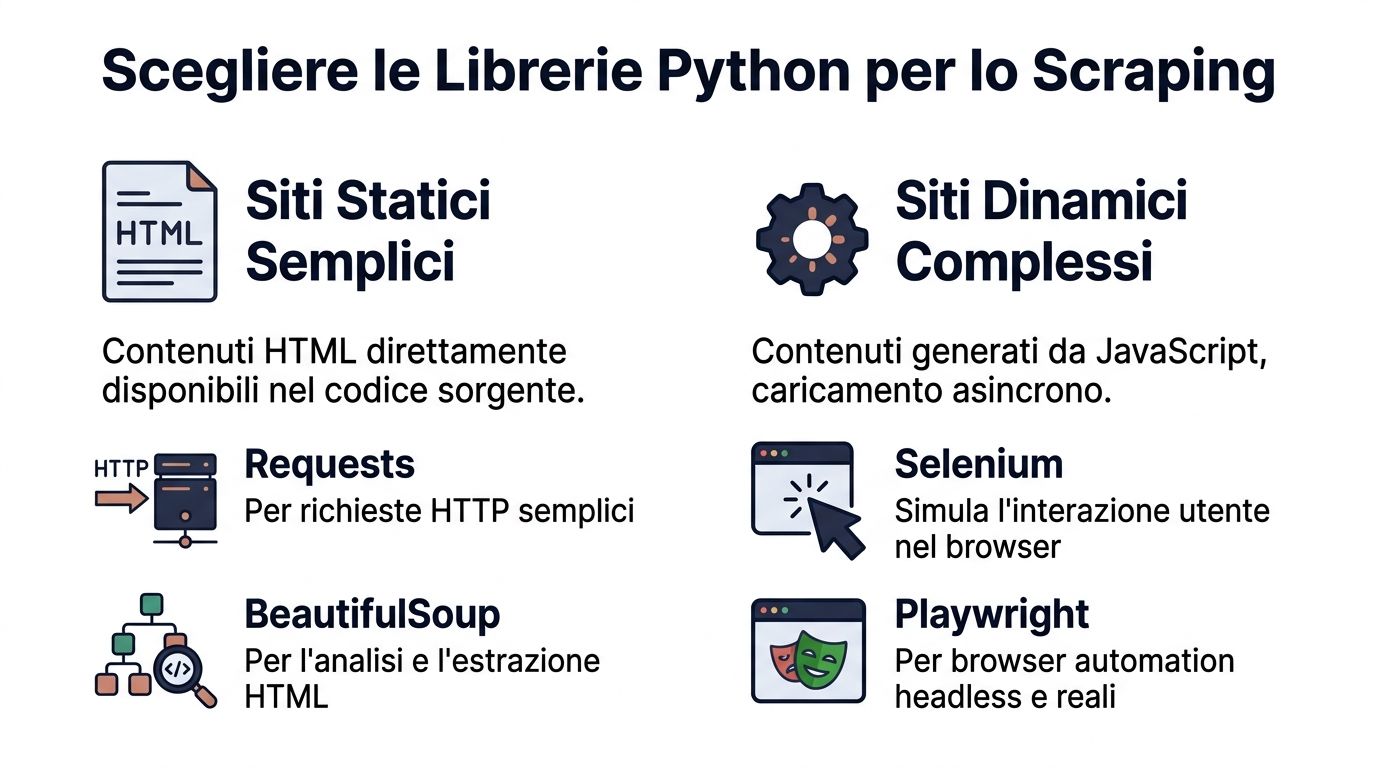
A 2025 report by Unioncamere Lombardia indicates that many Lombard tech companies use Python for scraping, contributing significantly to the region's economic value. In the same context, Scrapy shows a 45% adoption rate among Italian developers and Selenium is used in 55% of projects requiring interaction with JavaScript sites, cutting CAPTCHA blocks by 90% when paired with proxies, according to the ScraperAPI reference page on scraping with Python.
A lightweight stack for static pages
If the content is already in the original HTML, don't make things harder for yourself.
Requests + BeautifulSoup is still the most sensible starting point for:
- editorial sites with a regular structure
- simple public directories
- product pages rendered server-side
- listing pages without special interactions
This stack is great when you want to:
- quickly launching a scraper
- debugging with ease
- saving data as CSV or JSON
- keeping the code readable even for non-specialist colleagues
A simple example:
import requestsfrom bs4 import BeautifulSoupurl = "https://example.com/news"response = requests.get(url, timeout=20)response.raise_for_status()soup = BeautifulSoup(response.text, "html.parser")for article in soup.select("article"):title = article.select_one("h2")link = article.select_one("a")if title and link:print(title.get_text(strip=True), link.get("href"))
This approach works well as long as the data is actually in the HTML source. Before using it, open “View Page Source,” not just “Inspect.” If the data isn’t in the source, Requests alone won’t be enough.
When you need a real browser
If you see asynchronous loading, “load more” buttons, infinite scrolling, content generated by front-end frameworks, or mandatory user interactions, then the HTML parser alone won’t solve the problem.
This is where Selenium and Playwright come into play.
Selenium is a stable, widely-used choice. It's a good fit when you need to:
- click buttons
- fill in fields
- wait for elements loaded by the browser
- handle complex sites with user flows
Playwright tends to offer a more modern, cleaner API. If you're starting out today, many teams find it more straightforward for:
- more reliable waits
- multi-browser handling
- tidy headless automation
- interactions on SPAs and modern interfaces
The reality is this: browser automation offers more power, but it also means higher memory usage, longer processing times, and more maintenance.
If you can read a JSON endpoint from network traffic, do so. It's almost always more reliable than simulating clicks and scrolls.
When a project stops being just a script
There comes a point where you’re no longer just “scraping data.” You’re building a process.
This is where Scrapy becomes interesting. Not because it's simpler, but because it organizes things better:
- request queues
- pagination handling
- retries
- throttling
- cleaning pipelines
- structured exports
I recommend it when you need to work with many categories, many pages, or multiple domains that follow recurring patterns. For a one-time data extraction, it’s often overkill. For a continuous crawler, however, it saves you from having to reinvent components that you would otherwise have to spread across separate scripts.
You can also use a hybrid approach:
- Requests for quick tests.
- Playwright to check dynamic cases.
- Scrapy once the process goes into production.
Quick Comparison Chart
LibraryIdeal Use CaseJavaScript ManagementLearning CurveSpeedRequestsStatic pages, APIs, rapid prototypingNoLowHighBeautifulSoupSimple, readable HTML parsingNoLowMediumSeleniumBrowser interaction, forms, clicks, dynamic sitesYesMediumLowPlaywrightModern dynamic sites, more robust handling of delaysYesMediumMediumScrapyLarge-scale crawling, structured processesNot native, requires extensionHighHigh
A Practical Guide to Creating Your First Web Scraper
The first version of a scraper should do a few things well: read a page, find the right elements, clean up the text, and save the output in a useful format. Nothing more.

Prepare the environment and facilities
Keep the project isolated. A virtual environment prevents conflicts and makes the work reproducible.
Install only what is necessary:
pip install requests beautifulsoup4
Basic initial structure:
scraper.pyfor the codeoutput.csvfor the export- an internal README file with target URLs, selectors used and operational notes
It may seem obvious, but documenting the selectors you use right from the start will save you time when the site changes.
Review the page before writing code
Open the target page in your browser and use the developer tools. Look for the nodes that actually contain the data you're interested in.
Suppose we want to extract:
- news title
- link to the news item
Check three things:
- Is the content in the HTML source?
- Do the elements have sufficiently stable classes or tags?
- Is the link absolute or relative?
Don't choose fragile selectors, like classes auto-generated by the frontend. If you can select an article, an h2, or an area with a consistent structure, your scraper will last longer.
Writing a Basic Web Scraper with Requests and BeautifulSoup
Here is a complete and easy-to-read example.
import csvimport requestsfrom bs4 import BeautifulSoupfrom urllib.parse import urljoinBASE_URL = "https://example.com"TARGET_URL = "https://example.com/news"headers = {"User-Agent": "Mozilla/5.0"}response = requests.get(TARGET_URL, headers=headers, timeout=20)response.raise_for_status()soup = BeautifulSoup(response.text, "html.parser")rows = []for card in soup.select("article"):title_el = card.select_one("h2")link_el = card.select_one("a")if not title_el or not link_el:continuetitle = title_el.get_text(strip=True)link = urljoin(BASE_URL, link_el.get("href", "").strip())if title and link:rows.append({"titolo": title,"url": link})with open("output.csv", "w", newline="", encoding="utf-8") as f:writer = csv.DictWriter(f, fieldnames=["titolo", "url"])writer.writeheader()writer.writerows(rows)print(f"Elementi estratti: {len(rows)}")
For a first web scraper with python, this structure is already more than enough.
The flow is linear:
- download the page
- build the parser
- select the repeated blocks
- extract the fields
- save the output
Clean and save the results
Data quality is determined here. The most common issues aren’t technical. They’re operational:
- titles with extra spaces
- relative links
- duplicate rows
- irregular encoding
- empty fields
Before delivering the CSV, actually open it. If the file will end up in Excel, it's worth checking that columns and characters are readable. If you need a hand with this step, this Electe guide on how to manage CSV files in Excel can be useful.
A scraper that generates a messy CSV file just shifts the problem downstream. It doesn't solve it.
Good habits to start practicing right away:
- Use
strip()to clean the text. - Validate critical fields before saving.
- Normalize URLs with
urljoin. - Check for duplicates if the page repeats elements.
- Handle HTTP errors with
raise_for_status().
If the result seems fragile to you, it is. Before adding new features, make sure the foundation is solid.
Overcoming Advanced Obstacles Such as JavaScript and Anti-Bot Measures

When a scraper returns a nearly empty page, the problem is usually not Python. The problem lies in the site’s rendering model. Many modern interfaces load data after the initial HTML, using asynchronous requests or JavaScript components. Requests downloads the initial document. It does not act like a browser.
Understanding why a page returns empty data
Before switching to Selenium or Playwright, take a quick look at the developer tools:
- check the Network tab
- filter Fetch/XHR requests
- look for JSON responses
- check whether the useful data comes from separate endpoints
If you can find a clean, readable endpoint, that’s often the best approach. You get more structured data, less HTML clutter, and less maintenance.
If, on the other hand, the site actually builds the content in the browser, it uses browser automation. In that case, you need to handle timeouts correctly. The right approach isn’t “wait 5 seconds and hope for the best.” It’s to wait for the element to appear or for an observable condition to be met.
Anti-bot defenses cannot be overcome by brute force
Many websites block aggressive scraping to protect their infrastructure, data, and user experience. If you send too many requests, use unnatural headers, or repeatedly open browser sessions, the website will take action.
The most common mistakes are always the same:
- Requests that are too fast, triggering rate limiting.
- Poor or inconsistent headers that give away a script.
- Stateless sessions when the site expects cookies or tokens.
- Selectors based on repetitive clicks that break as soon as the frontend changes.
The professional approach is more understated:
- Slow down the pace of requests.
- Use sessions where continuity is needed.
- Set credible and consistent headers.
- Reduce the number of pages visited to only the data you really need.
- Prefer structured endpoints over full rendering when possible.
It’s not worth pursuing every anti-bot measure as a technical challenge. If the site is clearly hostile to scraping, consider whether the data can actually be obtained in a sustainable and compliant manner.
Building resilient web scrapers means reducing friction with the site, not winning a race against its defenses.
Ethical and Legal Web Scraping in Compliance with the GDPR in Italy
The most overlooked aspect of web scraping projects isn’t the parser. It’s liability. In the Italian context, this becomes much more significant when the data involves individuals, professional profiles, résumés, contact information, or data from job portals.
According to AGID 2025 data, several Italian SMEs have faced fines for violations related to scraping EU data, with a considerable number of penalties in Lombardy and Veneto in 2024-2025. The same source notes that scraping names from job portals can carry criminal risks under art. 167 of Legislative Decree 196/03. The reference appears in the practical guide by Real Python on web scraping.
Public does not mean free use
This is the first misconception we need to clear up. Just because data is available online doesn’t mean you can collect, combine, store, and reuse it without restriction.
In any serious work, at least four elements must be checked:
- Robots.txt. It's not the only legal criterion, but it indicates the site's stance.
- Terms of service. Some sites explicitly prohibit automated extraction or reuse.
- Presence of personal data. Names, emails, profiles, identifiable reviews, resumes.
- Purpose of processing. You need to know why you're collecting, how long you keep it, and who has access.
To get oriented on consent, collection and compliance, this Electe deep dive on cookies and online privacy, EU vs US regulations, Google Consent Mode and consent management is also useful.
A basic compliance checklist
If you need to build a web scraper at your company, this foundation is non-negotiable:
- Limit the scope. Collect only the fields necessary for the stated purpose.
- Avoid non-essential personal data. If you don't need it, don't extract it.
- Pseudonymize or anonymize where possible, already within the pipeline.
- Document the source of the data and the collection logic.
- Define retention periods consistent with actual use.
The point here isn't to become lawyers. It's to work like professionals. A well-written scraper isn't just efficient. It's also defensible.
From Data Extraction to Action with the ELECTE Platform
Many projects come to a halt too soon. The team manages to scrape the data, saves a CSV file, and maybe updates the file once a week. Then the process stops there. Without data cleansing, historical analysis, reporting, or forecasting, the value remains limited.
How to structure the process of turning data into insights
Here is the relevant passage:
- Extract consistent data from web sources.
- Normalize fields, formats, naming and keys.
- Track history of the readings over time.
- Compare variations, exceptions and patterns.
- Analyze in an environment that makes the data readable for the business too.
If you work in retail, this might involve tracking competitors’ prices and promotions over time. In finance or compliance, it might involve supplementing controls and monitoring lists with data from public sources. In marketing, reviews and editorial content can inform qualitative rankings and trend analysis.
When the workflow becomes recurring, it's better to connect scraping to an analytics system rather than a folder of local files. For those who need to integrate data collected from external sources into a broader ecosystem, it can also be useful to see how Electe manages integration via API with a verified Postman profile.
The principle is simple. Web scraping gathers raw data. The value emerges when that raw data is incorporated into a decision-making process.
Key Points to Remember
- Python is the most practical choice when you want to build a scraper that's readable, extensible and connectable to data analysis.
- The right library depends on the site. Requests and BeautifulSoup for static HTML. Playwright or Selenium for dynamic content. Scrapy for larger-scale processes.
- The first real job is understanding the page, not writing code.
- Raw data isn't enough. It needs to be cleaned, validated and saved in a reusable format.
- GDPR, terms of use and personal data are not secondary details. They're part of the project.
- A web scraper with python only makes sense if it leads to better decisions, not if it produces forgotten files.
Conclusion: Start Harnessing the Power of Web Data
Building a good web scraper means making sensible choices. The right tool for the right website. Stable selectors. Clean output. Controlled request rate. Legal compliance from the start.
This is why the web scraper with python remains one of the most useful projects for analysts, digital teams and SMEs. It lets you turn the web into an operational data source, without depending solely on manual exports or limited integrations.
The bottom line, however, isn’t the data extraction itself. It’s how the data is used. If you link the collected data to reports, trends, alerts, and historical data, data scraping ceases to be a technical task and becomes a concrete tool for decision-making.
You've already collected the data. The next step is turning it into clear, usable insight. With Electe, an AI-powered data analytics platform for SMEs, you can connect different sources, prepare data faster and get reports and analyses that genuinely help the business make decisions. If you want to move from raw files to faster decision-making, it's worth seeing how it works.
Comments
No comments yet — start the conversation.