AI Agentic Workflows Explained: How Autonomous Agents Work
Learn how AI agentic workflows monitor, decide and act, how they differ from automation, and how to govern them safely.

It's Thursday afternoon, and you're staring at a sales report that should have reached you on Monday. The numbers are fine, but they're late, and the question they raise now needs another three days of digging. If that rhythm sounds familiar, you're not short of data. You're short of a system that watches the data for you, notices what changed, and brings you a decision while there's still time to act. That's the gap AI agentic workflows are built to close.
What an AI Agentic Workflow Is and Why It Matters Now
An AI agentic workflow is a set of steps in which an AI system monitors business data, decides what matters, and takes or proposes an action within limits you set. It doesn't wait for a prompt. It watches, reasons through a task, and moves work forward.
Say a sales manager learns on Thursday that a promotion has been hurting margins since Monday. A weekly report eventually surfaces the problem, but three selling days are gone. An agentic workflow watching margin by promotion would flag the drift on Monday, check discount depth and volume, and send a short brief asking whether to pause or adjust the offer.
Think of the difference between a thermostat and a good facilities manager. The thermostat follows one rule. The manager watches many sensors, weighs trade-offs, and calls the right contractor.

Why adoption is moving now
In McKinsey's Global Survey on the State of AI, which surveyed 1,993 participants between June 25 and July 29, 2025, 62% of respondents said their organizations were at least experimenting with AI agents. Within that group, 39% had begun experimenting and 23% reported scaling an agentic AI system in at least one business function.
Scaling stayed narrow. In any individual business function, no more than 10% of respondents reported scaling agents, and most organizations at that stage did so in only one or two functions. Size mattered too. Nearly half of respondents from organizations generating more than $5 billion in annual revenue had reached the scaling phase, compared with 29% among organizations generating less than $100 million.
Broad experimentation has arrived before systematic scaling. For SMEs, the answer isn't a large AI team. It's lean governance around one repeatable workflow.
You'll learn how these workflows differ from older tools, how they're built, how to govern them, and where they pay off in analytics. The through line is simple. Treat an agent as an operating model with measurable reliability, not as a clever chat feature.
How Agentic Workflows Differ From Automation and Chatbots
The short answer is this. Rule-based automation runs fixed steps, a chatbot answers questions, and an agentic workflow watches for conditions, decides what to do, and acts across tools.
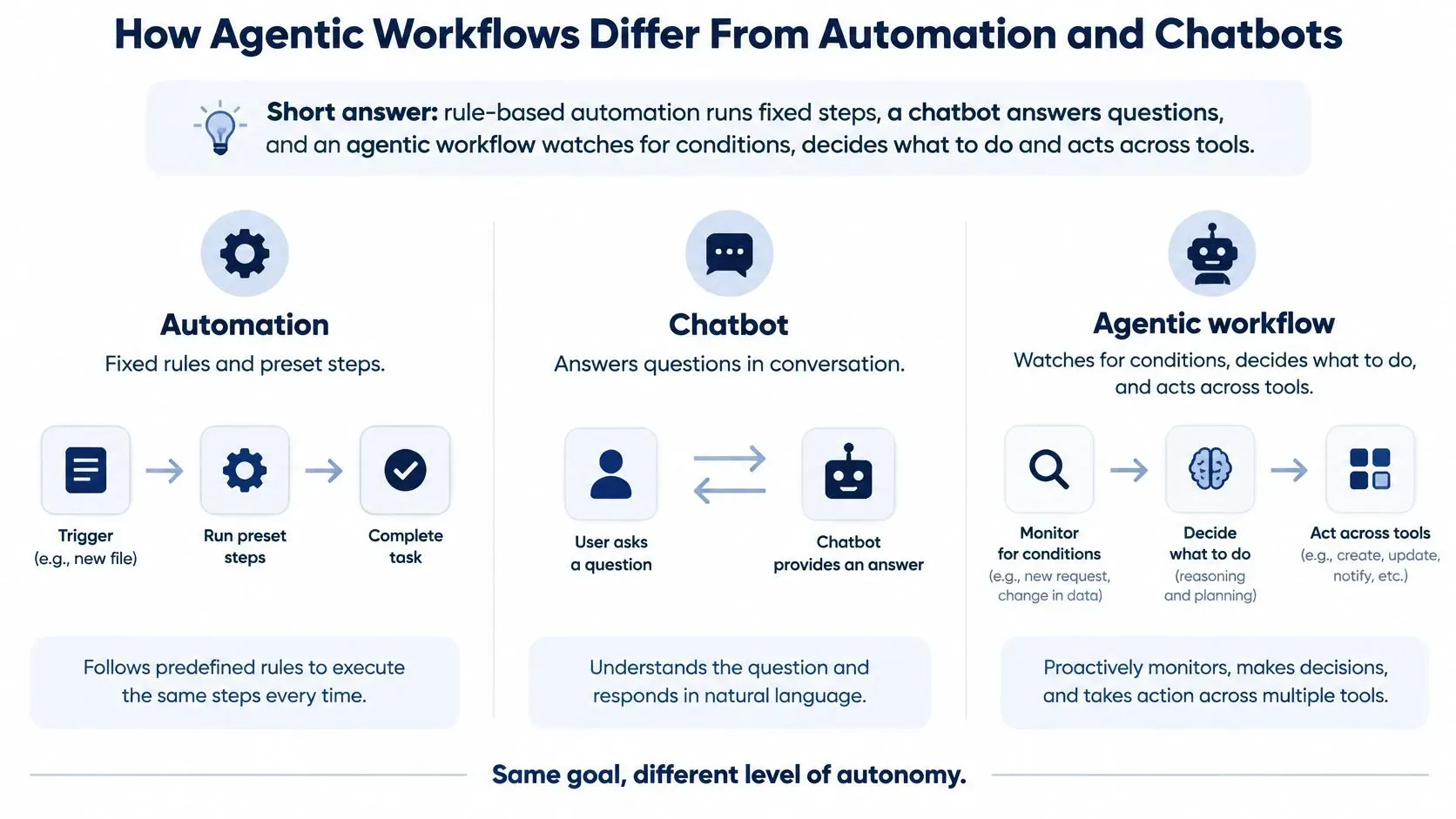
Agentic workflows compared with automation and chatbots
Dimension | Rule-based automation | Chatbot | Agentic workflow |
|---|---|---|---|
Trigger | Fixed event or schedule | User question | Schedule, event or threshold breach |
Decision-making | None; follows if-then rules | Answers within one reply | Plans steps and chooses tools from context |
Actions | Predefined steps only | Mostly text replies | Calls tools, writes reports, flags or routes items |
State across steps | None beyond the rule | Limited to the chat session | Tracks progress across the whole workflow |
Handling surprises | Stops or throws an error | Asks the user what to do | Retries, switches data source or escalates |
Human role | Builds and maintains the rules | Asks questions and reviews answers | Sets authority limits and reviews escalations |
Analytics example | Copies a sales file into a sheet every Monday | Answers why sales dropped when asked | Spots a revenue drift, checks channels and promotions, drafts the report |
Two common confusions
An agent isn't a chatbot with more features. A chatbot's job ends when it replies, even if the reply is excellent. An agent's job ends when a task is complete, correctly escalated, or safely stopped.
An agent also isn't fixed automation with a language model bolted on. Automation is ideal when the path never changes, such as copying a file every Monday or using an automated repricing tool that applies clear pricing rules to competitor data. The workflow becomes agentic when the system must choose the next step based on what it finds.
Practical test: Does it act without being asked, recover when a step fails, and keep context across the whole process? If it can't do all three, don't call it agentic yet.
That distinction protects your budget. You don't need agent complexity for stable, predictable work, and you shouldn't trust a chat interface to run a multi-step process it can't track or recover.
Inside the Monitor, Decide and Act Loop
An agentic workflow isn't a single model. It's a loop of connected parts, and each part prevents a specific kind of failure.
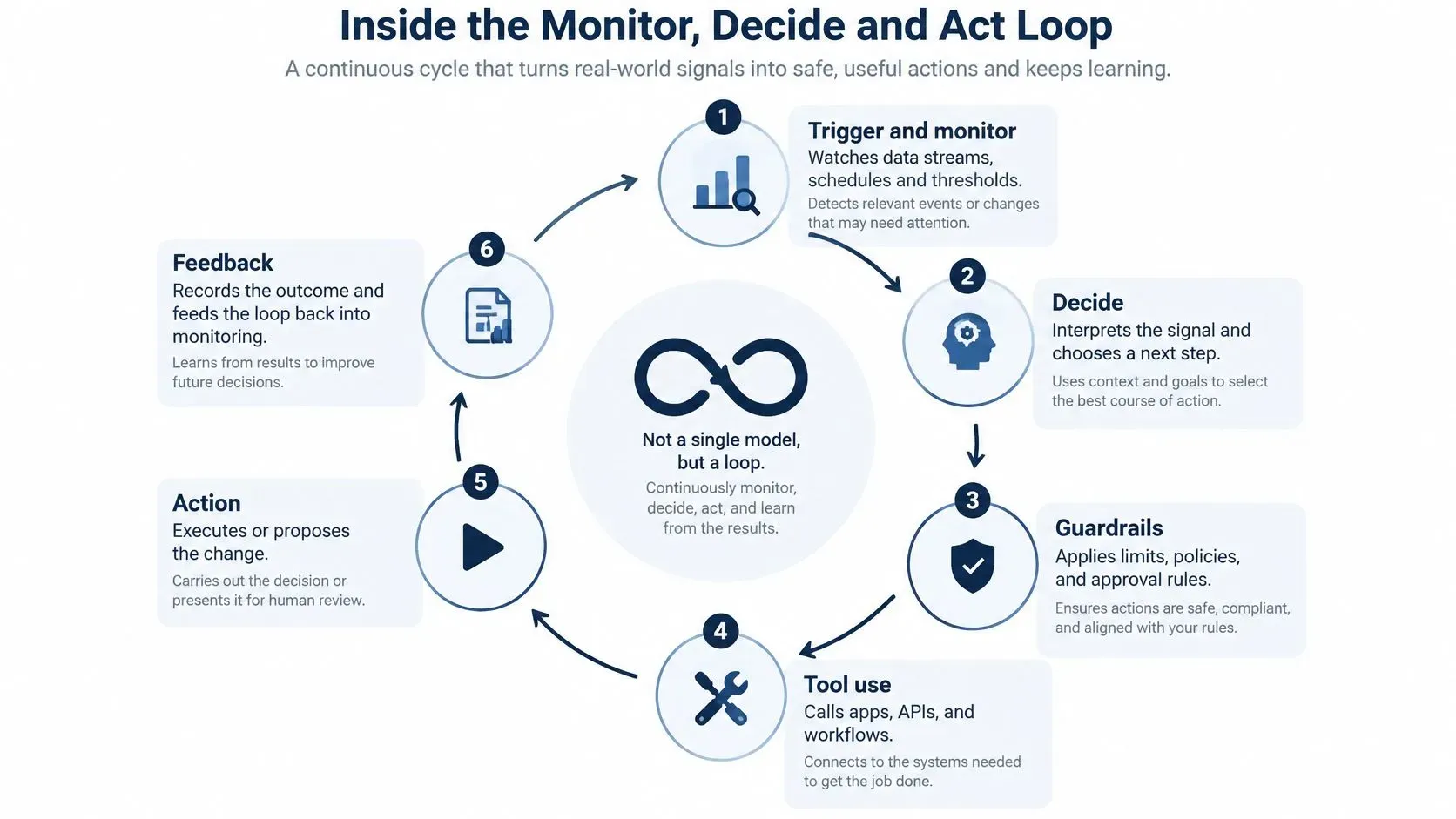
The six parts in order
- Trigger and monitor: Watches data streams, schedules, and thresholds, such as daily revenue against forecast. Without it, the agent only reacts when someone remembers to ask.
- Planner: Turns a goal into ordered steps, for example check orders, then traffic, then stock. Without it, the agent improvises and may skip the step that explains the result.
- Tool layer: Connects the agent to databases, spreadsheets, and APIs it can query. Without real tools, it may estimate a figure instead of retrieving it.
- State and memory: Records what's run, what's been found, and what's still open. Without state, step four forgets what step two discovered.
- Validation and guardrails: Checks source, freshness, permissions, and authority limits before acting. Without checks, stale data can pass as current evidence.
- Recovery and escalation: Retries within bounds, uses a fallback source, or hands the task to a person. Without it, silent failures can look like success.
An audit log should sit underneath the loop. Record each tool call, input, output, and decision so a reviewer can reconstruct why the agent produced a particular insight.
What happens when tools fail
Recovery isn't a nice extra. In the PlanBench-XL benchmark, agents performed 327 retail tasks across an ecosystem of 1,665 tools, requiring iterative tool discovery, evidence collection, and sequential execution. The strongest reported model achieved 51.90% accuracy when tools were fully available, but accuracy fell to 11.36% under severe blocking conditions involving missing, failing, or distracting tools.
The largest failures occurred when tool errors lacked explicit signals or when recovery required longer alternative action paths. That result points to concrete design requirements for analytics work:
- Typed tool contracts: Define expected inputs and outputs so malformed results are rejected.
- Explicit error states: Require tools to say they failed instead of returning empty or partial data.
- Bounded retries and fallbacks: Retry a set number of times, then switch source or escalate.
- Checkpointed plans: Save progress so recovery resumes from the failed step, not from zero.
- Confidence-based escalation: Don't publish an insight or trigger an action when evidence is weak.
Monitor planning failure, tool-selection failure, execution failure, and evidence-validation failure separately. Each has a different fix, and lumping them together hides where your loop is breaking.
Governance Tiers That Match Authority to Risk
Oversight should match what an agent can do and what happens if it's wrong. A blanket rule either slows harmless work or leaves consequential work undercontrolled.
A governance recommendation tied to NIST's AI Risk Management Framework describes tiered authorization based on autonomy level, scope of authority, whether actions are reversible, and deployment context. It also says organizations should define, assess, and document human-oversight processes while differentiating human and AI roles and responsibilities.
Authority tiers for agent actions
Authority tier | Example actions | Typical control |
|---|---|---|
Read-only insight | Refresh a dashboard, summarize trends | Logged access and cited sources |
Draft and recommend | Draft a monthly pack, flag an anomaly | Named reviewer before anything is shared |
Reversible internal write | Tag a record, update an internal forecast | Approval window and rollback path |
Consequential action | Change prices, release payments, close accounts | Human approval before execution and spending limits |
Regulated decision | Credit decisions, compliance filings | Documented human decision, evidence file and audit trail |
Making approval meaningful
A payment, account closure, credit decision, or compliance filing should trigger approval or a stronger control, while categorizing low-risk support tickets or refreshing an internal report can run automatically. Approval only works if reviewers receive the evidence, have a realistic window to intervene, and know what happens if they don't respond. AI analysis for SMEs helps frame the human role in practical terms.
Nominal shutdown access isn't meaningful control. Test approval gates, rollback paths, and escalation routes while the stakes are low.
The credit, AML, and compliance examples here are general information, not legal or financial advice. Handle customer and transaction data under your organization's privacy policy and applicable regulation.
Analytics Use Cases Where Agents Pay Off
Good use cases share a pattern. There's a recurring signal someone checks by hand, a decision that needs context, and an action a person can review before consequences land.

Analytics use cases for agentic workflows
Use case | What the agent monitors | Action it takes | Decision kept by people |
|---|---|---|---|
Sales anomaly alert | Daily orders by channel and region | Flags a drop and checks promotions and stock | Whether to change the campaign |
Revenue drift review | Revenue against forecast each period | Compares drivers and drafts an explanation | Which lever to pull |
Inventory and demand | Stock levels and sell-through | Proposes reorder quantities | Approves orders above a set value |
Cash-flow watch | Receivables, payables and bank balances | Forecasts shortfalls and alerts finance | Timing of payments |
Risk and AML monitoring | Transactions against rules and patterns | Raises alerts and compiles a case file | Whether to file or clear |
Board pack preparation | Monthly KPIs and variances | Drafts the pack and commentary | Final narrative and sign-off |
Retail and financial services examples
Say a retailer runs a promotion that lifts one channel while stock runs low in its two best-selling regions. The agent connects those signals, checks sell-through, and proposes reorder quantities for approval. Where competitor or marketplace pages must be gathered first, web scraping for structured data can turn messy external pages into fields the agent can validate and compare.
In financial services, the shape is different. The agent groups related alerts, retrieves transaction history, and compiles a case file, but a compliance officer decides whether to file or clear it. Knowing when to reject model outputs matters most at that judgment point.
The value is time recovered for analysts and faster attention to anomalies. You aren't removing judgment. You're moving it earlier, where it can still change the outcome.
Measuring Reliability Before You Trust an Agent
A demo can look perfect while the process underneath is unsafe. If your dashboard shows only completion rate, it can hide silent failures, wrong tool order, and an agent that keeps going after receiving invalid data.
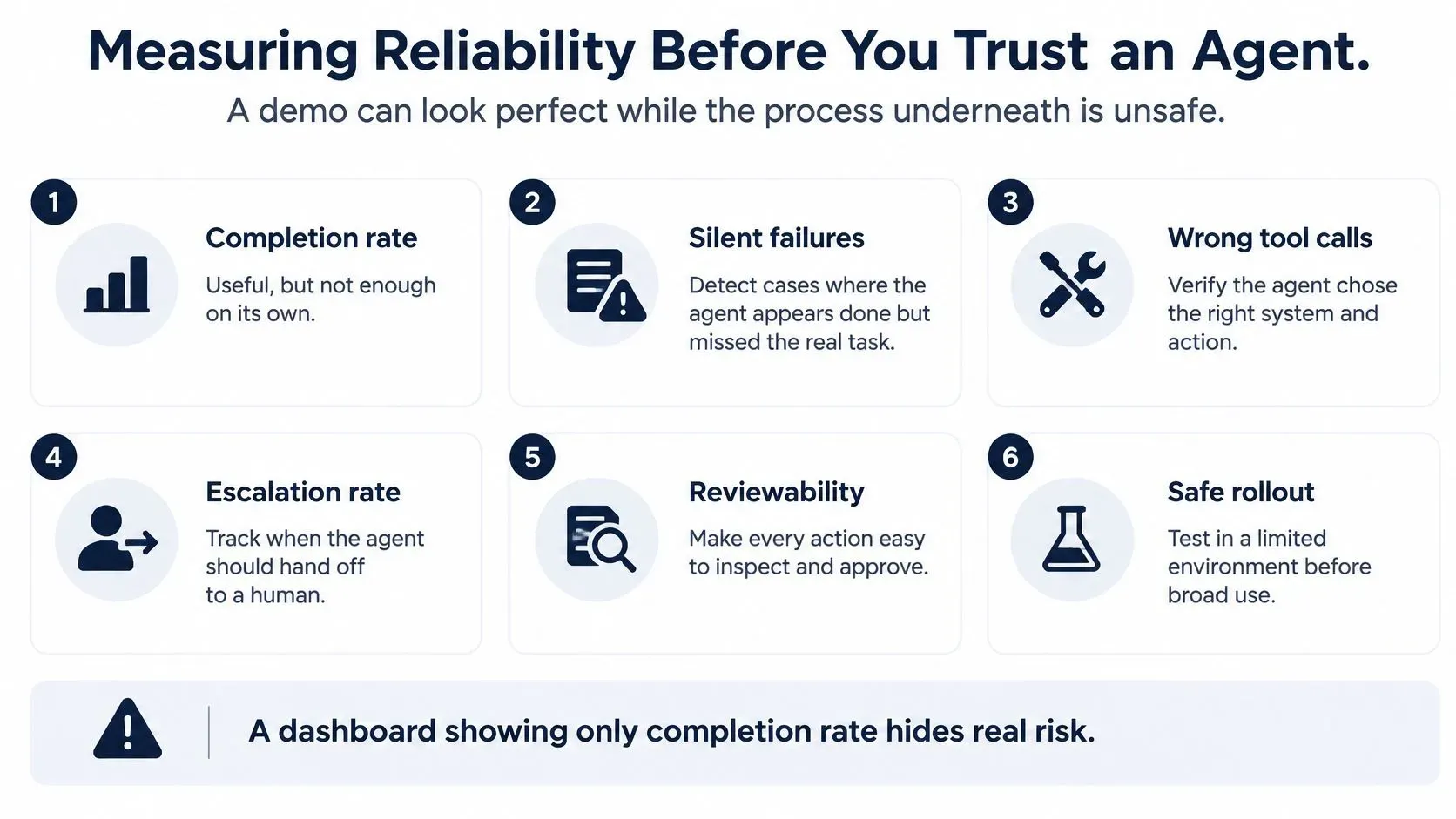
Seven metrics and their blind spots
- Task success: Checks the final outcome, but misses a correct answer reached through an unsafe path.
- Tool-selection accuracy: Catches plausible numbers pulled from the wrong tool or source.
- Sequence accuracy: Catches out-of-order steps that corrupt later calculations.
- Anomaly detection: Checks whether invalid, stale, or contradictory data was noticed.
- Recovery rate: Checks whether errors were retried, rerouted, or escalated well.
- Policy compliance: Checks whether approvals and permissions were respected, supported by tracking data completeness and accuracy in the underlying data.
- Latency and cost per completed task: Expose the overhead a polished demo hides.
The ToolBench-X benchmark uses executable, multi-step tasks across sequential, parallel, and mixed workflows, pairing deterministic tools with a canonical final answer. Its comparison table lists 1,106 tasks and 4,956 tool interactions for ToolBench-X. Its central finding is that failures are driven more by weak anomaly awareness and ineffective recovery than by the number of tools used or the amount of inference budget.
Adding more model calls doesn't fix an agent that can't notice bad data. Measure the process, not just the answer.
For an SME-sized version, build representative tasks for a sales forecast, inventory check, anomaly alert, and financial control. Define the correct tools and action order, log every call and outcome, then rerun the suite after each model, prompt, data, or workflow change. That turns agent quality into regression testing, not a subjective demo.
When to Route Work to an Agent and When Not To
Agents aren't free. They add time, cost, and failure points, so you should route work to them selectively.
In a benchmark comparing one-shot prompting with plan-execute-replan agents, described in a benchmark of tool-augmented planning, tool augmentation increased GPT-4o accuracy on event-centric question answering from 47.5% to 67.5%. Yet mean latency rose from approximately 8 seconds to approximately 317 seconds per example, roughly a 40-fold increase. In a second persuasive-response task, planning and search added latency without consistent accuracy gains.
Plan-execute-replan means the agent drafts a plan, runs tool steps in order, then revises the remaining plan when results come back. Because those latency and cost figures are per example, budget for them before rollout, not after users start waiting.
Routing requests to direct answers or agent workflows
Request type | Route | Verification needed |
|---|---|---|
Simple, well-defined metric lookup | Answer directly | Normal data checks |
Ambiguous question across several sources | Plan and use tools | Cross-source check |
Multi-step calculation or unfamiliar data schema | Plan and execute with tools | Recalculate key figures |
Forecast that will shape a budget | Agent drafts with several models | Human review of assumptions |
Action affecting money, compliance or customers | Agent proposes, human approves | Approval gate and audit log |
The verification rule
Verify more closely when a result affects forecasts, compliance, financial decisions, or automated actions. Don't spend that effort on a straightforward metric lookup that a direct query answers reliably.
Track latency budget, token cost per completed task, and accuracy as first-class workflow measures. If an agent route isn't buying better evidence or safer handling, route the request directly and save the overhead.
Pick One Workflow to Pilot This Quarter
Three ideas carry the whole approach. Agents monitor, decide, and act inside a loop with state and recovery. Authority should follow consequences. Reliability is measured on the process, not the demo.
Start with one recurring workflow, such as a weekly sales review or daily cash check. Assign its authority tier, pick three metrics such as task success, anomaly detection, and policy compliance, then run the agent in shadow mode for several cycles against your analyst's outputs. Record outputs, corrections, and escalations in a shared log, and widen authority only when the metrics hold. If you want more concrete patterns before choosing, AI Tool Seekers' practical agent guide is a useful companion.
ELECTE, an AI-powered data analytics platform for SMEs, is one option for starting that pilot. Its AI Agent reads data, writes reports, and researches the market on schedule or on demand, 24/7, and ELECTE connects in 5 minutes when you link accounts and data sources or upload an Excel file, with no integration project or technical setup required.
Put one recurring report on a supervised agentic workflow this quarter and measure whether decisions reach you sooner, with evidence you can audit. Visit ELECTE to see how the platform handles your own sales, cash flow, or inventory report, and start with the workflow your team already checks by hand every week.
Comments
No comments yet — start the conversation.